PaddleOCR-VL: Baidu 0.9B OCR Model Guide | 109 Languages Document Parser
PaddleOCR-VL Tutorial: Baidu 0.9B AI model for 109-language OCR. Parse text, tables, formulas & charts with Docker/Python API. SOTA performance beats GPT-4V.
Published 344 days ago. Content may be outdated.
What is PaddleOCR-VL?
PaddleOCR-VL is a revolutionary document parsing AI model launched by Baidu, using advanced Vision Language Model (VLM) technology. With only 0.9B parameters, it achieves performance that surpasses large-scale models. This OCR tool supports 109 languages for document recognition and can parse text, tables, mathematical formulas, and charts with one click.
Compared to traditional OCR tools, PaddleOCR-VL not only has higher recognition accuracy but also possesses powerful document understanding capabilities, making it one of the most advanced open-source document parsing solutions available today.
💡 Want to process multilingual documents, complex tables, or mathematical formulas? PaddleOCR-VL might be your best choice.
PaddleOCR-VL Core Features
🎯 Compact yet Powerful Model Architecture
The core of PaddleOCR-VL is a 0.9B parameter vision language model with innovative technical architecture:
- NaViT-style Dynamic Resolution Visual Encoder: Can process input images of different sizes
- ERNIE-4.5-0.3B Language Model: Provides powerful language understanding and generation capabilities
- Efficient Inference Design: Significantly reduces computational requirements while maintaining high accuracy
🌍 Extensive Multilingual Support
Supports 109 languages, covering major global language systems:
- Mainstream Languages: Chinese, English, Japanese, Korean, Latin
- Special Writing Systems: Russian (Cyrillic), Arabic, Hindi (Devanagari), Thai
- Historical Documents: Supports handwritten text and historical document recognition
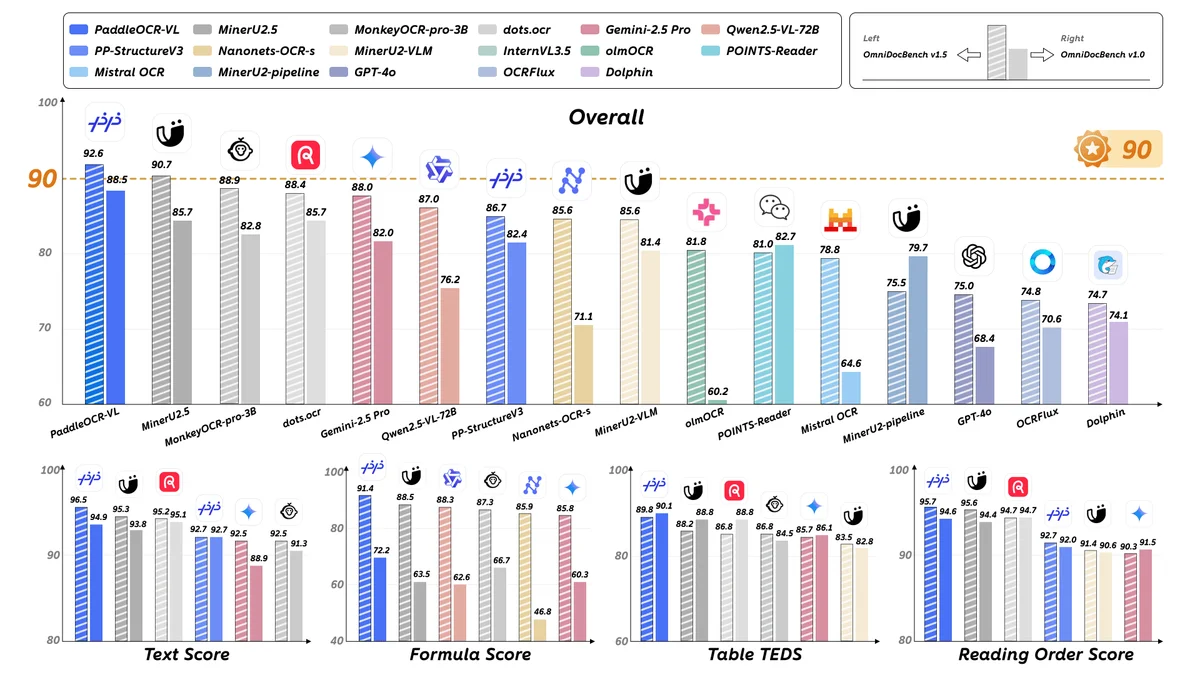
🏆 SOTA-level Performance
Achieves state-of-the-art performance in multiple authoritative benchmarks:
🎯 Element-level Recognition Capabilities
Text Recognition
- Multiple Document Types: Supports various documents like books, papers, reports
- Multilingual Mixed: Can handle complex documents with multiple languages
- Low Edit Distance: Achieves the lowest edit distance across all tested writing systems
Table Recognition
- Diverse Table Types: Full border, partial border, borderless tables
- Complex Structure Support: Merged cells, nested tables, list formats
- Quality Adaptability: Supports low-quality images and watermarked tables
Formula Recognition
- Multiple Formula Types: Printed formulas, handwritten formulas, complex mathematical expressions
- High Precision Output: Accurate formula representation in LaTeX format
- Scene Adaptation: Various scenarios from textbooks to academic papers
Chart Recognition
Supports 11 major chart types:
- Bar charts, line charts, pie charts, scatter plots
- Area charts, bubble charts, histograms
- Stacked charts, mixed charts, etc.
Technical Architecture Deep Dive
Visual Encoder Design
PaddleOCR-VL uses a NaViT-style dynamic resolution visual encoder, bringing several key advantages:
- Adaptive Resolution Processing: Dynamically adjusts processing resolution based on input image complexity
- Efficient Feature Extraction: Optimized feature extraction process for document images
- Multi-scale Information Fusion: Can capture both detail information and global layout simultaneously
Language Model Integration
Based on the ERNIE-4.5-0.3B lightweight language model providing:
- Context Understanding: Understands semantic and structural information of documents
- Multilingual Generation: Supports text output in 109 languages
- Formatted Output: Can generate structured document parsing results
Inference Deployment Performance
🚀 Multi-threaded Asynchronous Execution
PaddleOCR-VL adopts an optimized inference workflow:
- Data Loading Stage: PDF page rendering to images
- Layout Model Processing: Document layout analysis and element positioning
- VLM Inference Stage: Vision language model for content recognition
Each stage runs in independent threads with data transmission through queues, achieving efficient concurrent execution.
📈 Performance Benchmarks
Performance on processing 512 PDF files on a single NVIDIA A100 GPU:
- Processing Speed: Average 0.8 seconds per page
- Memory Usage: Peak GPU memory usage < 8GB
- Throughput: Can process 4500+ pages per hour
Quick Start Guide
🛠️ Environment Setup
First install PaddlePaddle and PaddleOCR:
       # Install PaddlePaddle GPU version
python -m pip install paddlepaddle-gpu==3.2.0 -i https://www.paddlepaddle.org.cn/packages/stable/cu126/

# Install PaddleOCR document parsing version
python -m pip install -U "paddleocr[doc-parser]"

# Install safetensors dependency
python -m pip install https://paddle-whl.bj.bcebos.com/nightly/cu126/safetensors/safetensors-0.6.2.dev0-cp38-abi3-linux_x86_64.whlNote: Windows users please use WSL or Docker containers. PaddleOCR-VL currently does not support CPU or ARM architecture.
GPU Hardware Requirements
Running PaddleOCR-VL has the following GPU hardware requirements:
- GPU Memory: Recommended 8GB+ VRAM
- CUDA Version: Supports CUDA 11.2+
- Graphics Card: NVIDIA GTX 1060 and above
- Special Note: If using NVIDIA 50 series graphics cards (Compute Capability >= 12), need to install specific version of FlashAttention
⚡ Command Line Quick Experience
Use a single command to quickly test PaddleOCR-VL:
       # Basic usage
paddleocr doc_parser -i https://paddle-model-ecology.bj.bcebos.com/paddlex/imgs/demo_image/paddleocr_vl_demo.png

# Enable document orientation classification
paddleocr doc_parser -i ./paddleocr_vl_demo.png --use_doc_orientation_classify True

# Enable document unwarping module
paddleocr doc_parser -i ./paddleocr_vl_demo.png --use_doc_unwarping True

# Disable layout detection
paddleocr doc_parser -i ./paddleocr_vl_demo.png --use_layout_detection False
🐍 Python API Integration
In actual projects, you usually need to integrate the model through code. Just a few lines of code can complete inference:
Basic Image Processing
       from paddleocr import PaddleOCRVL

# Initialize PaddleOCR-VL pipeline
pipeline = PaddleOCRVL()

# Optional configurations
# pipeline = PaddleOCRVL(use_doc_orientation_classify=True)  # Enable document orientation classification
# pipeline = PaddleOCRVL(use_doc_unwarping=True)           # Enable document unwarping
# pipeline = PaddleOCRVL(use_layout_detection=False)       # Disable layout detection

# Execute prediction
output = pipeline.predict("./paddleocr_vl_demo.png")

# Process results
for res in output:
    res.print()  # Print structured prediction output
    res.save_to_json(save_path="output")      # Save as JSON format
    res.save_to_markdown(save_path="output")  # Save as Markdown format
PDF Document Processing
For PDF files, each page will be processed individually and generate separate Markdown files. If you need to convert the entire PDF to a single Markdown file:
       from pathlib import Path
from paddleocr import PaddleOCRVL

input_file = "./your_pdf_file.pdf"
output_path = Path("./output")

# Initialize pipeline
pipeline = PaddleOCRVL()

# Process PDF
output = pipeline.predict(input=input_file)

# Collect Markdown content from all pages
markdown_list = []
markdown_images = []

for res in output:
    md_info = res.markdown
    markdown_list.append(md_info)
    markdown_images.append(md_info.get("markdown_images", {}))

# Merge Markdown content from all pages
markdown_texts = pipeline.concatenate_markdown_pages(markdown_list)

# Save merged Markdown file
mkd_file_path = output_path / f"{Path(input_file).stem}.md"
mkd_file_path.parent.mkdir(parents=True, exist_ok=True)

with open(mkd_file_path, "w", encoding="utf-8") as f:
    f.write(markdown_texts)

# Save image files
for item in markdown_images:
    if item:
        for path, image in item.items():
            file_path = output_path / path
            file_path.parent.mkdir(parents=True, exist_ok=True)
            image.save(file_path)
Using Inference Acceleration Frameworks for Performance Enhancement
The inference performance under default configuration may not meet production environment requirements. PaddleOCR supports enhancing VLM inference performance through inference acceleration frameworks like vLLM and SGLang.
🐳 Docker Quick Deployment
PaddleOCR provides Docker images to quickly start vLLM inference service:
Basic Startup
       docker run \
  -it \
  --rm \
  --gpus all \
  --network host \
  ccr-2vdh3abv-pub.cnc.bj.baidubce.com/paddlepaddle/paddlex-genai-vllm-server
Custom Configuration Startup
       docker run \
  -it \
  --rm \
  --gpus all \
  --network host \
  ccr-2vdh3abv-pub.cnc.bj.baidubce.com/paddlepaddle/paddlex-genai-vllm-server \
  paddlex_genai_server --model_name PaddleOCR-VL-0.9B --host 0.0.0.0 --port 8118 --backend vllm
NVIDIA 50 Series Graphics Card Support
If using NVIDIA 50 series graphics cards, need to install specific version of FlashAttention first:
       docker run \
  -it \
  --rm \
  --gpus all \
  --network host \
  ccr-2vdh3abv-pub.cnc.bj.baidubce.com/paddlepaddle/paddlex-genai-vllm-server \
  /bin/bash -c "python -m pip install flash-attn==2.8.3 && paddlex_genai_server --model_name PaddleOCR-VL-0.9B --backend vllm --port 8118"
⚙️ Local Installation of Inference Acceleration Framework
Since inference acceleration frameworks may have dependency conflicts with PaddlePaddle framework, it’s recommended to install in a virtual environment:
       # Create virtual environment
python -m venv .venv

# Activate environment
source .venv/bin/activate  # Linux/Mac
# .venv\Scripts\activate     # Windows

# Install PaddleOCR
python -m pip install "paddleocr[doc-parser]"

# Install inference acceleration service dependencies (vLLM)
paddleocr install_genai_server_deps vllm

# Or install SGLang
# paddleocr install_genai_server_deps sglang
Start Inference Acceleration Service
       # NVIDIA 50 series graphics cards need to install FlashAttention first
python -m pip install flash-attn==2.8.3

# Start vLLM service
paddlex_genai_server --model_name PaddleOCR-VL-0.9B --backend vllm --port 8118
Client Invocation
After starting the inference service, configure PaddleOCR pipeline to call the inference service:
       from paddleocr import PaddleOCRVL

# Configure to use inference acceleration service
pipeline = PaddleOCRVL(
    vl_rec_backend="server",
    vl_rec_server_url="http://localhost:8118",
    vl_rec_max_concurrency="4"
)

# Execute prediction
output = pipeline.predict("./your_image.png")
for res in output:
    res.print()
🔧 Parameter Configuration Description
Main Parameters
| Parameter | Type | Default | Description |
|---|---|---|---|
use_doc_orientation_classify | bool | False | Whether to enable document orientation classification |
use_doc_unwarping | bool | False | Whether to enable document unwarping module |
use_layout_detection | bool | True | Whether to enable layout detection |
use_chart_recognition | bool | False | Whether to enable chart recognition |
device | str | ”gpu:0” | Device selection (cpu/gpu:0/npu:0 etc.) |
layout_threshold | float | 0.5 | Layout detection threshold |
Supported Input Formats
- Image Files: Supports common image formats (JPG, PNG, BMP, etc.)
- PDF Files: Supports multi-page PDF documents
- Network URLs: Supports online image and PDF links
- Directory Paths: Batch processing of image files in directories
- NumPy Arrays: Direct processing of image data
Usage Recommendations and Best Practices
🔧 Deployment Recommendations
-
Hardware Requirements
- Recommended to use GPU acceleration (NVIDIA A100/V100/RTX series)
- Minimum 8GB GPU memory
- Supports CPU inference (with reduced performance)
-
Software Environment
- Python 3.8+
- PaddlePaddle framework
- CUDA 11.2+ (GPU version)
-
Performance Optimization
- Batch processing can significantly improve throughput
- Set appropriate image resolution to balance accuracy and speed
- Use multi-threaded asynchronous processing to improve efficiency
📝 Usage Tips
- Image Preprocessing: Ensure input image clarity and contrast
- Language Settings: Choose appropriate language model based on document’s main language
- Output Format: Select JSON, Markdown, or other structured formats based on needs
Comparison with Competitors
| Feature Comparison | PaddleOCR-VL | GPT-4V | Claude-3 | Gemini Pro |
|---|---|---|---|---|
| Model Size | 0.9B | ~1.7T | ~175B | ~540B |
| Language Support | 109 languages | 50+ | 95+ | 100+ |
| Professional Documents | ✅ Specially optimized | ❌ General | ❌ General | ❌ General |
| Deployment Cost | ✅ Low | ❌ High | ❌ High | ❌ High |
| Offline Usage | ✅ Supported | ❌ Online only | ❌ Online only | ❌ Online only |
Summary
PaddleOCR-VL, as Baidu’s latest achievement in the document parsing field, provides a new solution for document digitization and intelligent processing with its compact model scale, powerful multilingual support, and SOTA-level performance.
Core Advantages Summary:
- 🎯 Efficient and Compact: 0.9B parameters achieving SOTA performance
- 🌍 Multilingual Support: Covers 109 languages
- 🏆 Comprehensive Leadership: Leading in text, table, formula, and chart recognition
- ⚡ Deployment Friendly: Supports offline deployment with controllable costs
Whether for academic research, business applications, or government services, PaddleOCR-VL can provide strong technical support for your document processing needs. With continuous technological evolution and ecosystem improvement, we believe it will play an important role in more scenarios.
Reference Resources
More Articles