
HunyuanOCR Tutorial: 1B Param Model Outperforms DeepSeek/PaddleOCR/Qwen | Deployment Guide
HunyuanOCR: Tencent 1B OCR model beats DeepSeek-OCR (92% vs 10% on cards). Supports 100+ languages, vLLM OpenAI API deployment. Full code examples included.
Published 327 days ago. Content may be outdated.
What is HunyuanOCR?
HunyuanOCR is an end-to-end OCR expert Vision Language Model (VLM) developed by Tencent’s Hunyuan team. Built on Hunyuan’s native multimodal architecture, it achieves SOTA (state-of-the-art) performance across multiple industry benchmarks with only 1B parameters.
The most impressive aspect of this model is its “end-to-end” philosophy—completing complex tasks with a single instruction and single inference, far more efficient than solutions requiring multiple cascaded models.
💡 In simple terms, HunyuanOCR is a small but powerful OCR model capable of handling various complex document recognition tasks while supporting over 100 languages.
Core Features
💪 Efficient Lightweight Architecture
- 1B Parameter Design: Based on Hunyuan’s native multimodal architecture and training strategy, achieving SOTA performance with minimal parameters
- Low Deployment Cost: Significantly lower deployment threshold compared to models with tens or hundreds of billions of parameters
- End-to-End Inference: Complete tasks in a single inference without complex cascading pipelines
📑 Comprehensive OCR Capabilities
One model covering multiple classic OCR tasks:
- Text Detection & Recognition: Precisely locate and recognize text in images
- Complex Document Parsing: Handle complex documents containing formulas, tables, and charts
- Open-field Information Extraction: Extract structured information from cards, receipts, etc.
- Video Subtitle Extraction: Automatically extract subtitles from video frames
- Image Translation: End-to-end image text translation
- Document QA: Answer questions based on document content
🌏 Extensive Language Support
- Supports 100+ languages
- Excels in both single-language and mixed-language scenarios
- Specially optimized for 14 commonly used minor languages (German, Spanish, Turkish, Italian, Russian, French, Portuguese, Arabic, Thai, Vietnamese, Indonesian, Malay, Japanese, Korean) translation to Chinese/English
System Requirements
🖥️ Hardware Requirements
Running this model has certain hardware requirements:
- Operating System: Linux
- Python: 3.12+ (recommended)
- CUDA: 12.8
- PyTorch: 2.7.1
- GPU: NVIDIA GPU with CUDA support
- GPU Memory: 80GB
- Disk Space: 6GB
⚠️ Note: The 80GB GPU memory requirement means you’ll need professional GPUs like A100 or H100. Consumer-grade GPUs may not be able to run the full model.
Quick Start
🚀 Using vLLM (Recommended)
vLLM is the officially recommended inference method with better performance.
Installation
Using pip:
pip install vllm --pre --extra-index-url https://wheels.vllm.ai/nightlyUsing uv:
uv pip install vllm --extra-index-url https://wheels.vllm.ai/nightlyModel Inference
       from vllm import LLM, SamplingParams
from PIL import Image
from transformers import AutoProcessor

def clean_repeated_substrings(text):
    """Clean repeated substrings in text"""
    n = len(text)
    if n < 8000:
        return text
    for length in range(2, n // 10 + 1):
        candidate = text[-length:]
        count = 0
        i = n - length

        while i >= 0 and text[i:i + length] == candidate:
            count += 1
            i -= length

        if count >= 10:
            return text[:n - length * (count - 1)]

    return text

# Load model
model_path = "tencent/HunyuanOCR"
llm = LLM(model=model_path, trust_remote_code=True)
processor = AutoProcessor.from_pretrained(model_path)
sampling_params = SamplingParams(temperature=0, max_tokens=16384)

# Prepare input
img_path = "/path/to/image.jpg"
img = Image.open(img_path)
messages = [
    {"role": "user", "content": [
        {"type": "image", "image": img_path},
        {"type": "text", "text": "Detect and recognize text in the image, output text coordinates in formatted manner."}
    ]}
]

# Inference
prompt = processor.apply_chat_template(messages, tokenize=False, add_generation_prompt=True)
inputs = {"prompt": prompt, "multi_modal_data": {"image": [img]}}
output = llm.generate([inputs], sampling_params)[0]
print(clean_repeated_substrings(output.outputs[0].text))
Deploy OpenAI Compatible API Service
vLLM also supports deploying an OpenAI-compatible API server for easy integration into existing systems:
Start the service:
       vllm serve tencent/HunyuanOCR \
    --no-enable-prefix-caching \
    --mm-processor-cache-gb 0
Call using OpenAI client:
       from openai import OpenAI

# Create client
client = OpenAI(
    api_key="EMPTY",
    base_url="http://localhost:8000/v1",
    timeout=3600
)

# Build request
messages = [
    {
        "role": "user",
        "content": [
            {
                "type": "image_url",
                "image_url": {
                    "url": "https://example.com/your-image.png"
                }
            },
            {
                "type": "text",
                "text": (
                    "Extract all information from the main body of the document image "
                    "and represent it in markdown format, ignoring headers and footers. "
                    "Tables should be expressed in HTML format, formulas in the document "
                    "should be represented using LaTeX format, and the parsing should be "
                    "organized according to the reading order."
                )
            }
        ]
    }
]

# Send request
response = client.chat.completions.create(
    model="tencent/HunyuanOCR",
    messages=messages,
    temperature=0.0,
)

print(f"Result: {response.choices[0].message.content}")
Configuration Tips:
- Use greedy sampling (
temperature=0.0) or low temperature sampling for optimal OCR performance - OCR tasks typically don’t need prefix caching or image reuse; disable these features to avoid unnecessary hashing and caching overhead
- Adjust
max_num_batched_tokensparameter based on hardware capability for better throughput
🔧 Using Transformers
If you’re more familiar with the Transformers framework, you can use this approach:
Installation
pip install git+https://github.com/huggingface/transformers@82a06db03535c49aa987719ed0746a76093b1ec4Note: Currently, Transformers has some performance degradation compared to the vLLM framework. The team is working on fixes.
Model Inference
       from transformers import AutoProcessor
from transformers import HunYuanVLForConditionalGeneration
from PIL import Image
import torch

# Load model and processor
model_name_or_path = "tencent/HunyuanOCR"
processor = AutoProcessor.from_pretrained(model_name_or_path, use_fast=False)

# Prepare input
img_path = "path/to/your/image.jpg"
image_inputs = Image.open(img_path)
messages1 = [
    {
        "role": "user",
        "content": [
            {"type": "image", "image": img_path},
            {"type": "text", "text": "Detect and recognize text in the image, output text coordinates in formatted manner."},
        ],
    }
]
messages = [messages1]

# Process input
texts = [
    processor.apply_chat_template(msg, tokenize=False, add_generation_prompt=True)
    for msg in messages
]
inputs = processor(
    text=texts,
    images=image_inputs,
    padding=True,
    return_tensors="pt",
)

# Load model and inference
model = HunYuanVLForConditionalGeneration.from_pretrained(
    model_name_or_path,
    attn_implementation="eager",
    dtype=torch.bfloat16,
    device_map="auto"
)

with torch.no_grad():
    device = next(model.parameters()).device
    inputs = inputs.to(device)
    generated_ids = model.generate(**inputs, max_new_tokens=16384, do_sample=False)

# Decode output
if "input_ids" in inputs:
    input_ids = inputs.input_ids
else:
    input_ids = inputs.inputs

generated_ids_trimmed = [
    out_ids[len(in_ids):] for in_ids, out_ids in zip(input_ids, generated_ids)
]
output_texts = processor.batch_decode(
    generated_ids_trimmed, skip_special_tokens=True, clean_up_tokenization_spaces=False
)
print(output_texts)
Application Scenarios and Prompts
HunyuanOCR supports various tasks. Here are commonly used prompts:
📝 Text Spotting
Detect and recognize text in the image, and output the text coordinates in a formatted manner.📄 Document Parsing
| Task | Prompt |
|---|---|
| Formula Recognition | Identify the formula in the image and represent it using LaTeX format. |
| Table Parsing | Parse the table in the image into HTML. |
| Chart Parsing | Parse the chart in the image; use Mermaid format for flowcharts and Markdown for other charts. |
| Full Document | Extract all information from the main body of the document image and represent it in markdown format, ignoring headers and footers. Tables should be expressed in HTML format, formulas in the document should be represented using LaTeX format, and the parsing should be organized according to the reading order. |
📋 General Parsing
Extract the text in the image.🔍 Information Extraction
| Task | Prompt |
|---|---|
| Single Field | Output the value of Key. |
| Multiple Fields | Extract the content of the fields: [‘key1’,‘key2’, …] from the image and return it in JSON format. |
| Subtitle Extraction | Extract the subtitles from the image. |
🌐 Translation
First extract the text, then translate the text content into English. If it is a document, ignore the header and footer. Formulas should be represented in LaTeX format, and tables should be represented in HTML format.Performance Evaluation
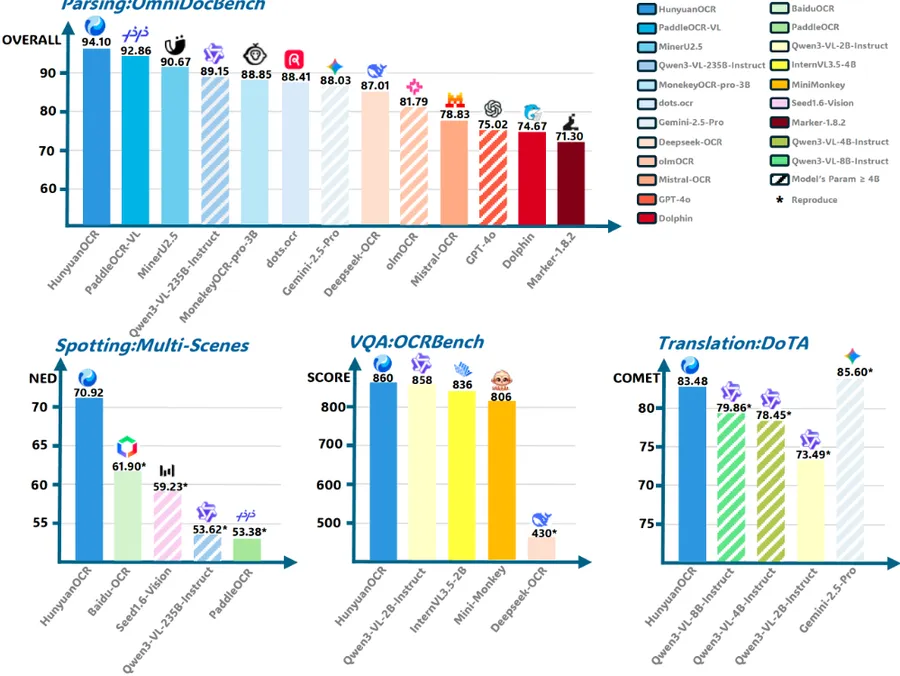
📊 Text Spotting Performance
In internal benchmark tests, HunyuanOCR’s overall performance:
| Model Type | Method | Overall Score |
|---|---|---|
| Traditional | PaddleOCR | 53.38 |
| Traditional | BaiduOCR | 61.9 |
| General VLM | Qwen3VL-2B-Instruct | 29.68 |
| General VLM | Qwen3VL-235B-Instruct | 53.62 |
| General VLM | Seed-1.6-Vision | 59.23 |
| OCR-Specific VLM | HunyuanOCR | 70.92 |
Summary: HunyuanOCR achieves the best overall performance (70.92%) across various scenarios, significantly outperforming both traditional OCR methods and general VLMs.
📑 Document Parsing Performance
On OmniDocBench and multilingual internal benchmarks:
| Model Type | Method | Parameters | OmniDocBench Overall |
|---|---|---|---|
| General VLM | Gemni-2.5-pro | - | 88.03 |
| General VLM | Qwen3-VL-235B | 235B | 89.15 |
| Specialized VLM (Modular) | MinerU2.5 | 1.2B | 90.67 |
| Specialized VLM (Modular) | PaddleOCR-VL | 0.9B | 92.86 |
| Specialized VLM (End2End) | Deepseek-OCR | 3B | 87.01 |
| Specialized VLM (End2End) | dots.ocr | 3B | 88.41 |
| Specialized VLM (End2End) | HunyuanOCR | 1B | 94.10 |
Summary: HunyuanOCR demonstrates superior performance in multilingual document parsing, achieving the lowest edit distances across most categories.
📋 Information Extraction & VQA Performance
| Model | Cards | Receipts | Video Subtitles | OCRBench |
|---|---|---|---|---|
| DeepSeek-OCR | 10.04 | 40.54 | 5.41 | 430 |
| Qwen3-VL-2B-Instruct | 67.62 | 64.62 | 3.75 | 858 |
| Gemini-2.5-Pro | 80.59 | 80.66 | 53.65 | 872 |
| Qwen3-VL-235B-A22B-Instruct | 75.59 | 78.4 | 50.74 | 920 |
| HunyuanOCR | 92.29 | 92.53 | 92.87 | 860 |
Summary: HunyuanOCR significantly outperforms larger models in card/receipt processing and video subtitle extraction, while maintaining competitive performance on OCRBench.
🌐 Image Translation Performance
| Method | Parameters | Other2En | Other2Zh | DoTA (en2zh) |
|---|---|---|---|---|
| Gemini-2.5-Flash | - | 79.26 | 80.06 | 85.60 |
| Qwen3-VL-235B-Instruct | 235B | 73.67 | 77.20 | 80.01 |
| Qwen3-VL-2B-Instruct | 2B | 66.30 | 66.77 | 73.49 |
| HunyuanOCR | 1B | 73.38 | 73.62 | 83.48 |
Summary: HunyuanOCR, with only 1B parameters, achieves comparable results to Qwen3-VL-235B in image translation tasks.
Application Scenarios
🔤 Text Detection & Recognition
The model can output text content and corresponding coordinate information at the line level for all text in an image, performing excellently in scenarios including documents, artistic fonts, street views, handwriting, advertisements, invoices, screenshots, games, and videos.
📚 Complex Document Processing
Capable of digitizing scanned or photographed multilingual document images, specifically:
- Organizing text content according to reading order
- Using LaTeX format for formulas
- Expressing complex tables in HTML format
📋 Open-field Information Extraction
For common cards and receipts, parse fields of interest (such as name/address/company) using standard JSON format.
Example Prompt:
Extract the content of the fields: ['unit_price', 'pickup_time', 'invoice_number', 'province_prefix', 'total_amount', 'invoice_code', 'dropoff_time', 'mileage'] from the image and return it in JSON format.Example Output:
       {
    "unit_price": "3.00",
    "pickup_time": "09:01",
    "invoice_number": "42609332",
    "province_prefix": "陕",
    "total_amount": "¥77.10",
    "invoice_code": "161002018100",
    "dropoff_time": "09:51",
    "mileage": "26.1km"
}
🎬 Video Subtitle Extraction
The model can automatically extract subtitles from videos, including bilingual subtitles.
🌍 Image Text Translation
The model can translate photographed images in minor languages into Chinese or English text format end-to-end. It won the small model track championship in the ICDAR2025 document end-to-end translation competition.
Comparison with Other OCR Solutions
| Feature | HunyuanOCR | PaddleOCR | DeepSeek-OCR | General VLM |
|---|---|---|---|---|
| Parameters | 1B | - | 3B | 2B-235B |
| End-to-End | ✅ | ❌ | ✅ | ✅ |
| Multilingual | 100+ | Limited | Limited | Extensive |
| Document Parsing | Excellent | Good | Good | Average |
| Info Extraction | Excellent | Average | Average | Good |
| Video Subtitles | Excellent | Average | Poor | Average |
| Image Translation | Excellent | Average | - | Good |
Conclusion
HunyuanOCR represents a significant breakthrough by Tencent’s Hunyuan team in the OCR field. With only 1B parameters, it outperforms much larger models on multiple tasks, fully embodying the “small but powerful” design philosophy.
Key Advantages:
- 🎯 Parameter Efficient: 1B parameters achieving SOTA performance, low deployment cost
- 🚀 End-to-End: Complete tasks in single inference, high efficiency
- 🌏 Multilingual: Supports 100+ languages, extensive coverage
- 📑 Comprehensive: Text recognition, document parsing, information extraction, translation all in one
- ⚡ Strong Performance: Leading in multiple benchmark tests
Points to Note:
- 💾 High GPU Memory Requirement: Requires 80GB GPU memory, difficult to run on consumer-grade GPUs
- 🐧 Linux Only: Currently only supports Linux systems
If you have suitable hardware, HunyuanOCR is definitely one of the most worthwhile open-source OCR models to try.
References
More Articles






