
GLM-OCR: 0.9B Parameters Top OmniDocBench, Zhipu AI's Open-Source OCR Champion
GLM-OCR: 0.9B OCR model tops OmniDocBench V1.5 (94.62). Fast inference at 1.86 pages/sec, excels in formulas, tables & complex docs. Open-source with vLLM/SGLang/Ollama support.
Published 258 days ago. Content may be outdated.
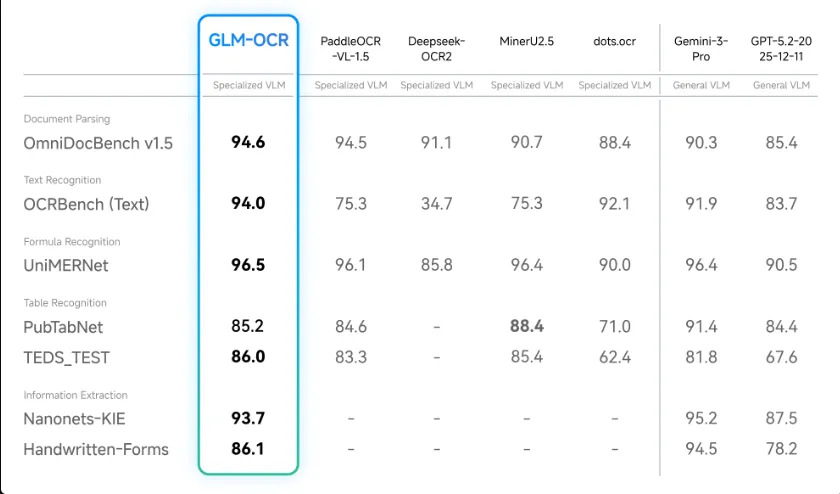
Zhipu AI officially open-sources GLM-OCR, a multimodal OCR model designed for complex document understanding. With only 0.9B parameters, GLM-OCR achieves 94.62 score on OmniDocBench V1.5, ranking #1, and delivers state-of-the-art results across major document understanding benchmarks including formula recognition, table recognition, and information extraction.
TL;DR: Small Model, Big Capabilities
GLM-OCR achieves with less than 1B parameters:
- 📊 #1 on OmniDocBench V1.5 (94.62 score)
- ⚡ Fast inference: 1.86 pages/sec for PDFs, 0.67 images/sec
- 🎯 Real-world optimized: Excels on complex tables, code docs, seals
- 🔓 Fully open-source: MIT license, supports vLLM, SGLang, Ollama
Core Technical Highlights
Architecture Design
GLM-OCR is built on GLM-V encoder-decoder architecture with three core components:
| Component | Technical Solution | Purpose |
|---|---|---|
| Visual Encoder | CogViT (large-scale image-text pretrained) | Extract image features |
| Cross-Modal Connector | Lightweight design + efficient token downsampling | Vision-language alignment |
| Language Decoder | GLM-0.5B | Generate text output |
Training Innovations
1. Multi-Token Prediction (MTP) Loss
- Improves training efficiency
- Enhances recognition accuracy
2. Stable Full-Task Reinforcement Learning
- Improves generalization
- Adapts to diverse document layouts
3. Two-Stage Processing Pipeline
- Stage 1: Layout analysis based on PP-DocLayout-V3
- Stage 2: Parallel recognition processing
Performance: Numbers Speak
Document Parsing & Information Extraction Benchmarks
| Benchmark | GLM-OCR | Description |
|---|---|---|
| OmniDocBench V1.5 | 94.62 🏆 | Comprehensive document understanding, #1 ranking |
| Formula Recognition | SOTA | Math formulas, LaTeX recognition |
| Table Recognition | SOTA | Complex table structure extraction |
| Information Extraction | SOTA | Structured data extraction |
Real-World Scenario Performance
GLM-OCR is specifically optimized for practical business scenarios:
| Scenario Type | Performance | Advantages |
|---|---|---|
| Complex Tables | Excellent | Cross-page tables, nested tables |
| Code Documents | Excellent | Code blocks, syntax highlighting |
| Seal Recognition | Robust | Circular, elliptical, irregular seals |
| Mixed Layouts | Robust | Text-image mix, multi-column layouts |
Speed Comparison: Impressively Fast
Under identical hardware and testing conditions (single replica, single concurrency), GLM-OCR’s throughput significantly outperforms comparable models:
| Input Type | GLM-OCR Speed | Competitive Edge |
|---|---|---|
| PDF Documents | 1.86 pages/sec | Significantly faster than comparable models |
| Images | 0.67 images/sec | Efficient processing |
Why So Fast?
- Only 0.9B parameters, low inference overhead
- Optimized model architecture
- Supports high-performance inference frameworks (vLLM, SGLang)
Usage: Multiple Deployment Options
Option 1: vLLM (Recommended for Production)
       # Install
pip install -U vllm --extra-index-url https://wheels.vllm.ai/nightly

# Or use Docker
docker pull vllm/vllm-openai:nightly

# Start service
pip install git+https://github.com/huggingface/transformers.git
vllm serve zai-org/GLM-OCR \
  --allowed-local-media-path / \
  --port 8080
Option 2: SGLang (High-Performance Inference)
       # Docker method
docker pull lmsysorg/sglang:dev

# Or install from source
pip install git+https://github.com/sgl-project/sglang.git#subdirectory=python

# Start service
pip install git+https://github.com/huggingface/transformers.git
python -m sglang.launch_server \
  --model zai-org/GLM-OCR \
  --port 8080
Option 3: Ollama (Simplest)
       # Download Ollama: https://ollama.com/download

# One-line run
ollama run glm-ocr
Ollama Tip: Drag and drop images directly into the terminal!
       ollama run glm-ocr
Text Recognition: ./image.png
Option 4: Transformers (Development & Debugging)
       from transformers import AutoProcessor, AutoModelForImageTextToText
import torch

MODEL_PATH = "zai-org/GLM-OCR"

# Build messages
messages = [
    {
        "role": "user",
        "content": [
            {"type": "image", "url": "test_image.png"},
            {"type": "text", "text": "Text Recognition:"}
        ],
    }
]

# Load model
processor = AutoProcessor.from_pretrained(MODEL_PATH)
model = AutoModelForImageTextToText.from_pretrained(
    MODEL_PATH,
    torch_dtype="auto",
    device_map="auto",
)

# Inference
inputs = processor.apply_chat_template(
    messages,
    tokenize=True,
    add_generation_prompt=True,
    return_dict=True,
    return_tensors="pt"
).to(model.device)

inputs.pop("token_type_ids", None)
generated_ids = model.generate(**inputs, max_new_tokens=8192)
output_text = processor.decode(
    generated_ids[0][inputs["input_ids"].shape[1]:],
    skip_special_tokens=False
)
print(output_text)
Supported Task Types
1. Document Parsing
Extract raw content from documents:
| Task | Prompt | Purpose |
|---|---|---|
| Text Recognition | Text Recognition: | Extract plain text |
| Formula Recognition | Formula Recognition: | Extract math formulas |
| Table Recognition | Table Recognition: | Extract table structures |
2. Information Extraction
Extract structured information using strict JSON Schema:
Example: Extract ID Card Information
       prompt = """Please output the information in the image according to the following JSON format:
{
    "id_number": "",
    "last_name": "",
    "first_name": "",
    "date_of_birth": "",
    "address": {
        "street": "",
        "city": "",
        "state": "",
        "zip_code": ""
    },
    "dates": {
        "issue_date": "",
        "expiration_date": ""
    },
    "sex": ""
}"""
⚠️ Important: For information extraction, output must strictly adhere to the defined JSON Schema to ensure downstream processing compatibility.
GLM-OCR SDK: Easier Usage
Zhipu AI provides an easy-to-use SDK for more efficient and convenient GLM-OCR usage.
Visit the GitHub repository for detailed documentation and example code.
SDK Features:
- 🚀 One-line invocation
- 📦 Simple installation
- 🔧 Smooth integration into existing production pipelines
- 📚 Complete documentation and examples
Technical Comparison: Why Choose GLM-OCR?
| Feature | GLM-OCR | Traditional OCR | Other Multimodal OCR |
|---|---|---|---|
| Parameters | 0.9B | - | Usually >7B |
| Inference Speed | 1.86 pages/sec | Slower | Slower |
| Complex Docs | ✅ Excellent | ❌ Weak | ✅ Good |
| Deployment Cost | 💰 Low | 💰 Low | 💰💰 High |
| Open Source | ✅ MIT | ❌ Mostly closed | ⚠️ Partially open |
| Ease of Use | ✅ Multiple deployment options | ⚠️ Average | ⚠️ Average |
Use Cases
GLM-OCR is particularly suitable for:
| Scenario | Description | Advantages |
|---|---|---|
| Document Digitization | Scans, PDF to text | High accuracy, fast |
| Receipt Recognition | Invoices, receipts, contracts | Structured extraction |
| Academic Literature | Papers, textbooks, formulas | Strong formula recognition |
| Table Extraction | Financial statements, data tables | Complex table handling |
| Edge Deployment | Mobile, embedded devices | Small parameter count |
| High-Concurrency Services | API services, batch processing | Fast inference |
License & Acknowledgements
License
- GLM-OCR Model: MIT License
- PP-DocLayoutV3 (document layout analysis): Apache License 2.0
When using this project, please comply with both licenses.
Acknowledgements
GLM-OCR development was inspired by these excellent projects:
- PP-DocLayout-V3 - Document layout analysis
- PaddleOCR - OCR toolkit
- MinerU - Document parsing
Community & Support
- 🌐 Official Docs: docs.z.ai/guides/vlm/glm-ocr
- 💬 Discord: Join community
- 📱 WeChat: Scan QR code to join
- 🔧 GitHub: zai-org/GLM-OCR
- 🤗 Hugging Face: zai-org/GLM-OCR
Conclusion: A New Choice for OCR
GLM-OCR proves that “small models can have big capabilities” with 0.9B parameters:
✅ Top performance: #1 on OmniDocBench V1.5 (94.62) ✅ Fast: 1.86 pages/sec, production-ready ✅ Real-world optimized: Handles complex tables, code, seals ✅ Flexible deployment: vLLM, SGLang, Ollama options ✅ Fully open-source: MIT license, commercial-friendly
For developers and enterprises needing high-quality document OCR capabilities, GLM-OCR is worth trying—combining top-tier performance with excellent inference efficiency, all fully open-source and free.
Related Resources:
More Articles






