
vLLM Integrates dots.ocr: A Tutorial for Easy Multilingual Document Parsing
vLLM now supports Xiaohongshu's dots.ocr for free multilingual OCR. Follow our tutorial to deploy this powerful model in two steps for parsing text, tables, and formulas.

Published 385 days ago. Content may be outdated.
Intro
vLLM just dropped some big news: it now directly supports the open-source OCR model dots.ocr from Xiaohongshu’s HI Lab. This means document parsing with vLLM is about to get incredibly simple.
This article cuts to the chase—we’ll show you how powerful dots.ocr is and get you up and running with just two commands.
💡 Want to add a fast and accurate OCR feature to your project? You’re in the right place.
How Powerful is dots.ocr?
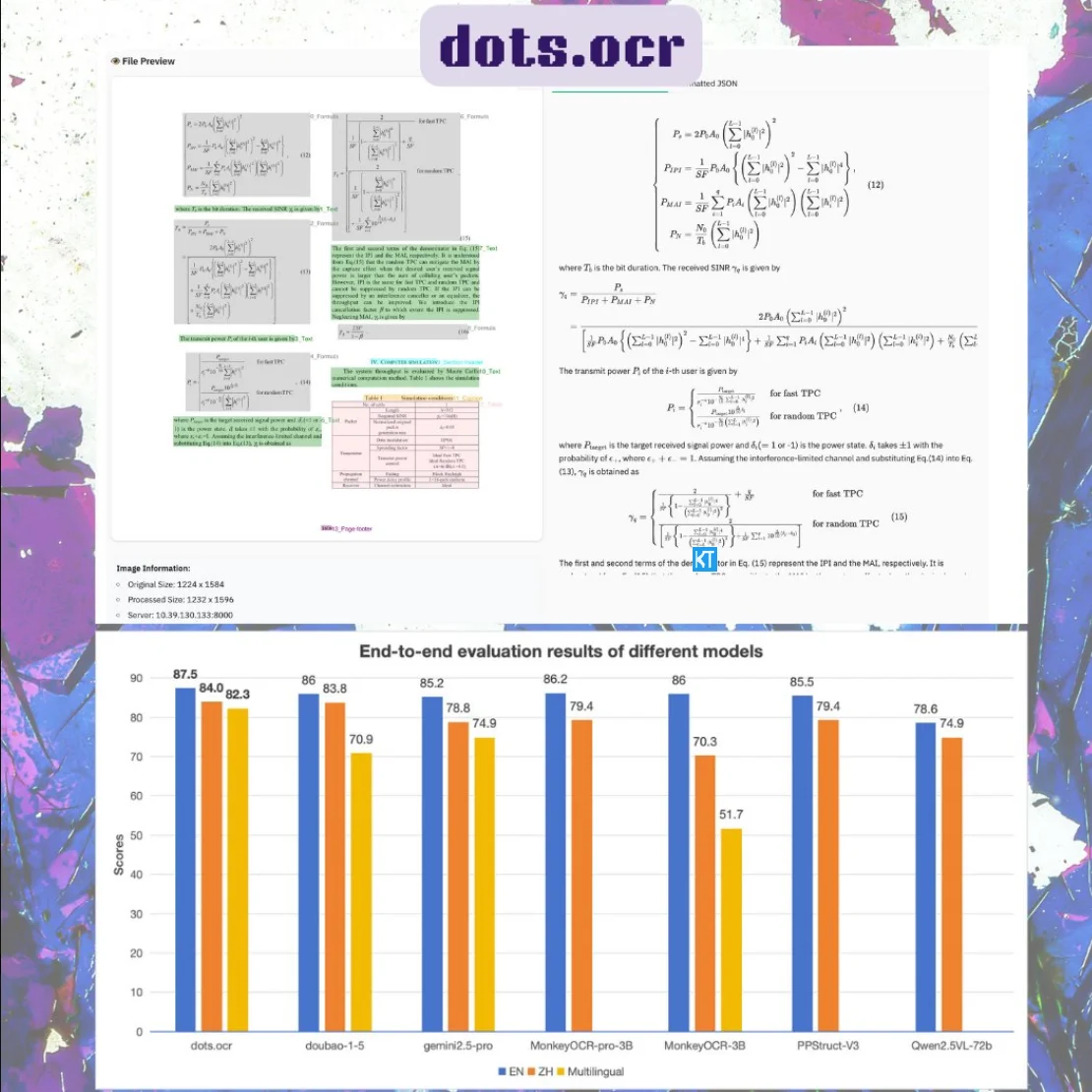
dots.ocr is a multilingual VLM from Xiaohongshu HI Lab, built specifically for document understanding. Here are the highlights:
- 📝 All-in-One Parser: It handles plain text, HTML tables, LaTeX formulas, and Markdown layouts in one go. No extra steps needed.
- 🌍 Handles 100+ Languages: It performs solidly even with low-resource languages, offering broad coverage.
- 🚀 SOTA Performance: At just 1.7B parameters, the model achieves state-of-the-art results on benchmarks like
OmniDocBenchanddots.ocr-bench. Small model, big impact. - 💼 Free for Commercial Use: It’s open-source and free for commercial use—a huge plus for developers.
Get it Running in Two Steps
Deploying dots.ocr is dead simple. It only takes two steps.
Step 1: Install vLLM
First, install the latest version of vLLM. The official recommendation is to use the nightly build. A single command with uv or pip will do the trick:
uv pip install vllm --extra-index-url https://wheels.vllm.ai/nightly💡 Using
uvis blazing fast, butpipworks just fine too.
Step 2: Start the Service
Once installed, fire up the dots.ocr service with this command:
vllm serve rednote-hilab/dots.ocr --trust-remote-codeWith the service running, you can start throwing requests at it.
Conclusion
Bottom line, vLLM’s integration with dots.ocr gives developers an awesome tool for document parsing. It’s powerful, easy to deploy, and free. Whether you’re processing multilingual documents, extracting tables, or pulling formulas from images, it’s got you covered.
Go give it a try!
Resources
More Articles






