
【Major Release】CosyVoice 3.0 Tech Guide: Next-Gen Zero-Shot Speech Generation
Released on 2025-12-15, CosyVoice 3.0 features 9 languages, 18+ dialects, and pronunciation inpainting. This guide covers model setup, inference, and full local deployment.
Published 308 days ago. Content may be outdated.
1. 🚀 Major Release: CosyVoice 3.0 is Here
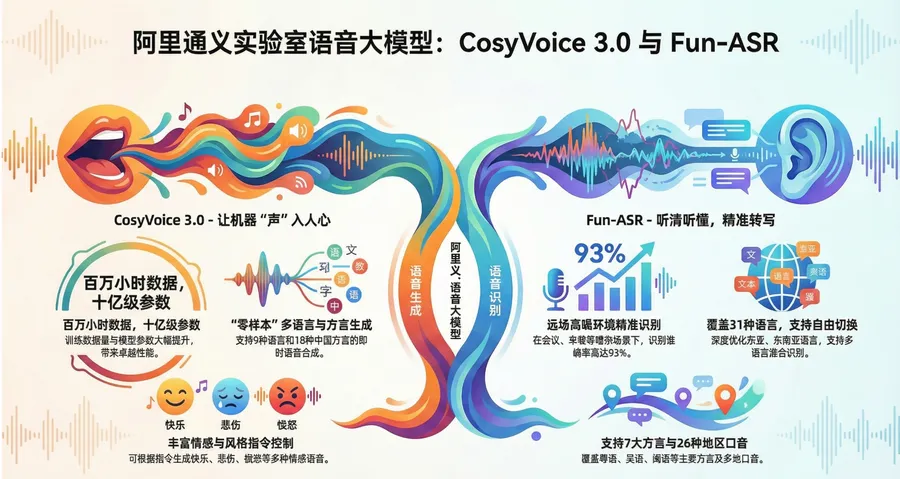
On December 15, 2025, the FunAudioLLM team officially open-sourced CosyVoice 3.0. As the latest iteration of the CosyVoice series, version 3.0 achieves a qualitative leap in “in-the-wild” speech generation capabilities.
Compared to version 2.0, the core breakthroughs of version 3.0 lie in:
- Stronger Model Foundation: The official recommendation is to use
Fun-CosyVoice3-0.5B, which fully surpasses the previous generation while remaining lightweight (0.5B). - Comprehensive Language Coverage: Natively supports 9 mainstream languages (Chinese, English, Japanese, Korean, German, Spanish, French, Italian, Russian) and 18+ Chinese dialects (Cantonese, Hokkien, Sichuanese, Northeastern, Shanghainese, etc.).
- Extreme Controllability: Added Pronunciation Inpainting feature, supporting fine-grained adjustment at the Pinyin/phoneme level.
- Instruction-Driven: Supports controlling speech speed, emotion, volume, etc., via Instruct commands, making speech generation more expressive.
Official Resources:
- 📦 Code Repository: GitHub - FunAudioLLM/CosyVoice
- 🎮 Online Demo: ModelScope Studio
2. Environment Preparation and Installation
As the first technical guide, we have sorted out the local deployment process for you. It is recommended to use a Linux or Windows (WSL2) environment equipped with an NVIDIA GPU.
2.1 Clone Repository and Configure Environment
       # 1. Clone code (note --recursive to include submodules)
git clone --recursive https://github.com/FunAudioLLM/CosyVoice.git
cd CosyVoice
# If submodule fetching fails, run separately:
# git submodule update --init --recursive

# 2. Create Conda environment (Python 3.10 is recommended officially)
conda create -n cosyvoice -y python=3.10
conda activate cosyvoice

# 3. Install dependencies (using Aliyun mirror for acceleration if needed)
pip install -r requirements.txt

# 4. (Optional) System-level dependencies (to solve sox compatibility issues)
# Ubuntu: sudo apt-get install sox libsox-dev
# CentOS: sudo yum install sox sox-devel
3. Model Download (Latest 3.0 Version)
The official release provides multiple versions of the model. For production and experience, it is strongly recommended to prioritize downloading Fun-CosyVoice3-0.5B-2512.
       from modelscope import snapshot_download
import os

# Create model storage directory
os.makedirs('pretrained_models', exist_ok=True)

# Download CosyVoice 3.0 Core Model (Recommended)
snapshot_download('FunAudioLLM/Fun-CosyVoice3-0.5B-2512', local_dir='pretrained_models/Fun-CosyVoice3-0.5B')

# (Optional) Download CosyVoice 2.0 and other older versions
# snapshot_download('iic/CosyVoice2-0.5B', local_dir='pretrained_models/CosyVoice2-0.5B')

# (Optional) Download TTS Frontend Enhancement Package (Recommended for better text normalization)
snapshot_download('iic/CosyVoice-ttsfrd', local_dir='pretrained_models/CosyVoice-ttsfrd')
4. Practical Inference: From 0 to 1
4.1 Basic Inference
example.py in the root directory of the repository is the fastest entry point. It demonstrates how to load the model and perform simple speech synthesis.
python example.py4.2 WebUI Interactive Experience
CosyVoice 3.0 provides a fully functional WebUI, suitable for exploring the effects of different Prompts and instructions on the voice.
       # Start WebUI, specifying the model path to the downloaded 3.0 version
python3 webui.py --port 50000 --model_dir pretrained_models/Fun-CosyVoice3-0.5B
After startup, visit http://localhost:50000 in your browser. You can try:
- Zero-Shot Cloning: Upload a 3-10 second reference audio, input text, and generate speech with the same timbre.
- Cross-Lingual Cloning: Use Chinese reference audio to synthesize English speech (Version 3.0 has greatly optimized this).
- Instruction Control: Adjust speech speed and emotion in advanced options.
4.3 Advanced Feature: Pronunciation Inpainting
The “Pronunciation Inpainting” feature introduced in version 3.0 is very practical. When you find that the model pronounces certain polyphonic characters or rare words inaccurately, you can intervene directly through Pinyin/phonemes without retraining the model. This is crucial for applications in vertical fields (medical, legal, etc.).
5. Deployment Suggestions
For developers wishing to integrate CosyVoice 3.0 into business systems, the official release provides standard containerization solutions.
Docker Deployment (gRPC / FastAPI)
       cd runtime/python
docker build -t cosyvoice:v1.0 .

# Start gRPC service
docker run -d --runtime=nvidia -p 50000:50000 cosyvoice:v1.0 /bin/bash -c "cd /opt/CosyVoice/CosyVoice/runtime/python/grpc && python3 server.py --port 50000 --max_conc 4 --model_dir iic/CosyVoice-300M && sleep infinity"

# Start FastAPI service
docker run -d --runtime=nvidia -p 50000:50000 cosyvoice:v1.0 /bin/bash -c "cd /opt/CosyVoice/CosyVoice/runtime/python/fastapi && python3 server.py --port 50000 --model_dir iic/CosyVoice-300M && sleep infinity"
Note: When deploying, please replace model_dir with the actual path of Fun-CosyVoice3-0.5B.
6. FAQ
Q: What is the main difference between CosyVoice 3.0 and 2.0? A: 3.0 is stronger in multi-language support (especially dialects), prosody naturalness, and controllability (pronunciation inpainting), while keeping the model parameters at 0.5B, maintaining high inference efficiency.
Q: Why is git clone very slow?
A: The repository contains submodules. It is recommended to configure a Git proxy or use domestic mirrors.
Q: What if I encounter sox errors on Windows?
A: Windows does not natively support sox. It is recommended to skip system-level sox installation and ensure torchaudio in the python environment works properly, or use WSL2 for a complete Linux experience.
The release of CosyVoice 3.0 marks a new stage of “all-round and controllable” for open-source speech generation models. Whether for short video dubbing, intelligent customer service, or personalized voice interaction, it is currently a highly competitive choice.
More Articles






