
SAM3 Tutorial: Meta AI Image Segmentation Model Guide | 4M+ Concepts
Master SAM3: Meta's revolutionary AI segmentation model with 4M+ concepts. Complete tutorial covering installation, Python examples, text prompts for precise image/video segmentation. Boost your CV projects with this open-vocabulary model guide.
Published 333 days ago. Content may be outdated.
SAM3 (Segment Anything Model 3) is a revolutionary open-vocabulary segmentation model just released by Meta Superintelligence Labs. Honestly, this model is truly impressive—it not only inherits the powerful capabilities of SAM2 but also achieves genuine concept understanding for the first time.
Simply put, SAM3 can now “understand” what you’re saying! You just need to describe a concept in natural language, and it can find and segment it in images and videos. Plus, this guy has a huge “vocabulary”—it can understand over 4 million different concepts. This “concept segmentation” capability represents another major breakthrough in computer vision.
For example, just say “player wearing white jersey” and SAM3 can instantly find and precisely segment all people matching this description. This ability to “understand human language” is truly impressive!
🚀 Core Advantages
- Open-Vocabulary Concept Segmentation: The first model that truly “understands human language” and performs segmentation
- Massive Concept Library: Supports 4M+ concepts, 50 times more than existing benchmarks!
- Multi-Modal Prompt Support: Whether you want to use text, clicks, or boxes, no problem
- Near-Human Performance: Achieves 75-80% of human performance on SA-Co tests, quite impressive
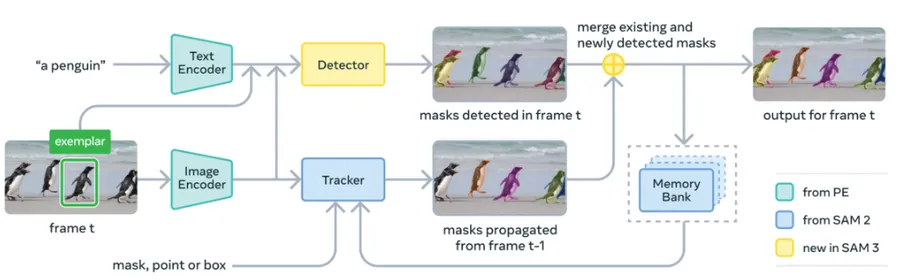
- Unified Architecture Design: Detector and tracker work independently without interference, higher efficiency
- Existence Judgment: Very practical feature that accurately distinguishes similar concepts (like “red jersey player” vs “white jersey player”)
🏗️ Model Architecture
Core Components
- Shared Visual Encoder: Efficient visual feature extractor shared by detector and tracker
- DETR Detector: DETR architecture detector based on text, geometry, and image example conditions
- SAM2 Tracker: Inherits SAM2’s Transformer encoder-decoder architecture
- Existence Token: Innovative existence judgment mechanism that improves similar concept distinction
- Text Encoder: Language understanding module for processing natural language text prompts
- Multi-Modal Fusion Layer: Cross-modal understanding component that integrates visual and language features
Workflow
| Step | Processing Stage | Main Operation | Input Type | Output Result |
|---|---|---|---|---|
| 1 | Concept Understanding | Parse text prompts and understand concept semantics | Natural language text | Concept embeddings |
| 2 | Visual Feature Extraction | Shared encoder extracts image/video features | Raw pixel data | High-dimensional feature maps |
| 3 | Cross-Modal Fusion | Fuse visual features and text concept embeddings | Visual features + concept embeddings | Multi-modal representation |
| 4 | Object Detection | DETR detector locates objects matching concepts | Multi-modal representation | Bounding boxes + confidence |
| 5 | Fine Segmentation | Generate high-quality instance segmentation masks | Detection results + visual features | Segmentation masks |
| 6 | Existence Judgment | Existence token judges if concept truly exists | Global features | Existence scores |
🛠️ Environment Setup
System Requirements
- Operating System: Linux, Windows, MacOS
- Python: 3.12+
- PyTorch: 2.7+
- CUDA: 12.6+
- GPU: NVIDIA GPU (recommended 16GB+ VRAM for 848M parameter model)
- Memory: 32GB+ RAM (recommended)
- Storage: At least 50GB available space
1. Create Virtual Environment
       # Create Conda environment (Python 3.12 recommended)
conda create -n sam3 python=3.12
conda deactivate
conda activate sam3
2. Install PyTorch
       # Install PyTorch 2.7 with CUDA 12.6 support
pip install torch==2.7.0 torchvision torchaudio --index-url https://download.pytorch.org/whl/cu126
3. Install SAM3
       # Clone project repository
git clone https://github.com/facebookresearch/sam3.git
cd sam3

# Install SAM3
pip install -e .

# Install example notebook dependencies (optional)
pip install -e ".[notebooks]"

# Install development and training dependencies (optional)
pip install -e ".[train,dev]"
4. Get Model Access Permission
Important Note: SAM3 is currently quite “exclusive” and requires permission application:
- Visit SAM3 Hugging Face Repository
- Apply for access permission and wait for approval
- Generate Hugging Face access token
- Authenticate:
       # Install huggingface_hub
pip install huggingface_hub

# Login to Hugging Face
hf auth login
# Enter your access token
5. Verify Installation
       # Verify PyTorch and CUDA installation
python -c "import torch; print(f'PyTorch: {torch.__version__}'); print(f'CUDA available: {torch.cuda.is_available()}')"

# Verify SAM3 installation
python -c "from sam3.model_builder import build_sam3_image_model; print('SAM3 installation successful!')"Tips:
- SAM3 is a “big guy” (848M parameters), make sure you have enough GPU memory
- First run will automatically download the model, might take a while
- If network is slow, try configuring Hugging Face mirror sources
🎯 Quick Start
Image Segmentation Example
Basic Text Prompt Segmentation
       import torch
from PIL import Image
import matplotlib.pyplot as plt
from sam3.model_builder import build_sam3_image_model
from sam3.model.sam3_image_processor import Sam3Processor

# Load SAM3 model
model = build_sam3_image_model()
processor = Sam3Processor(model)

# Load image
image = Image.open("your_image.jpg")
inference_state = processor.set_image(image)

# Here's the magic moment! Use text to describe what you want
text_prompt = "player wearing white jersey"  # You can input any concept
output = processor.set_text_prompt(state=inference_state, prompt=text_prompt)

# Get segmentation results
masks = output["masks"]        # Segmentation masks
boxes = output["boxes"]        # Bounding boxes
scores = output["scores"]      # Confidence scores

# Display results
def show_results(image, masks, boxes, scores, text_prompt):
    fig, axes = plt.subplots(1, len(masks) + 1, figsize=(15, 5))

    # Show original image
    axes[0].imshow(image)
    axes[0].set_title("Original")
    axes[0].axis('off')

    # Show segmentation results
    for i, (mask, box, score) in enumerate(zip(masks, boxes, scores)):
        axes[i+1].imshow(image)
        axes[i+1].imshow(mask, alpha=0.6, cmap='viridis')

        # Draw bounding box
        x1, y1, x2, y2 = box
        rect = plt.Rectangle((x1, y1), x2-x1, y2-y1,
                           fill=False, color='red', linewidth=2)
        axes[i+1].add_patch(rect)

        axes[i+1].set_title(f"Score: {score:.3f}")
        axes[i+1].axis('off')

    plt.suptitle(f'Text Prompt: "{text_prompt}"', fontsize=16)
    plt.tight_layout()
    plt.show()

show_results(image, masks, boxes, scores, text_prompt)
Complex Concept Segmentation Example
       # Let's try more complex descriptions to test SAM3's "understanding ability"
complex_prompts = [
    "person wearing glasses",
    "red car",
    "bird flying in the sky",
    "laptop on the table",
    "animal eating grass"
]

for prompt in complex_prompts:
    print(f"\nSegmenting: {prompt}")

    # Reset image state
    inference_state = processor.set_image(image)

    # Execute segmentation
    output = processor.set_text_prompt(state=inference_state, prompt=prompt)

    if len(output["masks"]) > 0:
        print(f"Wow, found {len(output['masks'])} matching objects!")
        # Check best result score
        best_idx = output["scores"].argmax()
        print(f"Best match score: {output['scores'][best_idx]:.3f} (higher is more accurate)")
    else:
        print("Hmm, no matching objects found")
Video Segmentation Example
       import torch
from sam3.model_builder import build_sam3_video_predictor

# Initialize SAM3 video predictor
video_predictor = build_sam3_video_predictor()

# Set video path (can be JPEG folder or MP4 file)
video_path = "your_video.mp4"  # or "./video_frames/" folder

# Start video segmentation session
response = video_predictor.handle_request(
    request=dict(
        type="start_session",
        resource_path=video_path,
    )
)

session_id = response["session_id"]
print(f"Great, video session started, ID: {session_id}")

# Add text prompt at specified frame
frame_index = 0  # Choose a frame as starting frame
text_prompt = "running person"  # Your text prompt

response = video_predictor.handle_request(
    request=dict(
        type="add_prompt",
        session_id=session_id,
        frame_index=frame_index,
        text=text_prompt,
    )
)

# Get segmentation results
output = response["outputs"]
print(f"Found {len(output)} matching objects in frame {frame_index}")

# Process each detected object
for i, obj in enumerate(output):
    object_id = obj["object_id"]
    mask = obj["mask"]
    score = obj["score"]

    print(f"Object {i+1}: ID={object_id}, Score={score:.3f}")

    # Save mask or perform further processing
    # mask is a numpy array, can be used directly

# Interactive refinement (optional)
# You can add click prompts to fine-tune results
refinement_response = video_predictor.handle_request(
    request=dict(
        type="add_point",
        session_id=session_id,
        frame_index=frame_index,
        object_id=output[0]["object_id"],  # Select first object
        point=[320, 240],  # Click coordinates
        is_positive=True,  # Positive click (foreground)
    )
)

print("Done! Video segmentation and interactive optimization completed!")
Batch Video Processing
       # Process multiple video files
video_files = ["video1.mp4", "video2.mp4", "video3.mp4"]
text_prompts = ["soccer player", "cyclist", "swimmer"]

results = []

for video_file, prompt in zip(video_files, text_prompts):
    print(f"\nProcessing: {video_file} - '{prompt}'")

    # Start new session
    response = video_predictor.handle_request(
        request=dict(
            type="start_session",
            resource_path=video_file,
        )
    )

    session_id = response["session_id"]

    # Add text prompt
    response = video_predictor.handle_request(
        request=dict(
            type="add_prompt",
            session_id=session_id,
            frame_index=0,
            text=prompt,
        )
    )

    results.append({
        "video": video_file,
        "prompt": prompt,
        "output": response["outputs"]
    })

    print(f"Found {len(response['outputs'])} matching objects")

print(f"\nGreat! Batch processing completed, processed {len(results)} videos in one go")
SAM3 Agent Advanced Features
SAM3 also provides SAM3 Agent for handling more complex text prompts:
       from sam3.agent import Sam3Agent

# Initialize SAM3 Agent
agent = Sam3Agent()

# Load image
image = Image.open("complex_scene.jpg")

# Complex text prompt examples
complex_prompts = [
    "person wearing red shirt and running",
    "blue small car parked on roadside",
    "girl sitting on park bench reading book",
    "white airplane flying in sky",
    "black and white cow eating grass"
]

for prompt in complex_prompts:
    print(f"\nProcessing complex prompt: {prompt}")

    # Use Agent to process complex prompts
    result = agent.segment_with_complex_prompt(image, prompt)

    if result["success"]:
        masks = result["masks"]
        confidence = result["confidence"]
        print(f"Segmentation successful, confidence: {confidence:.3f}")
        print(f"Found {len(masks)} matching objects")
    else:
        print(f"Segmentation failed: {result['error']}")
🔧 Advanced Features
1. Multi-Concept Simultaneous Segmentation
       # Simultaneously segment multiple different concepts in the same image
from sam3.model.sam3_image_processor import Sam3Processor

processor = Sam3Processor(build_sam3_image_model())
inference_state = processor.set_image(image)

# Define multiple concepts
concepts = [
    "person",
    "car",
    "building",
    "tree",
    "animal"
]

all_results = {}

for concept in concepts:
    print(f"Segmenting: {concept}")

    # Reset state to avoid interference
    inference_state = processor.set_image(image)

    # Execute segmentation
    output = processor.set_text_prompt(state=inference_state, prompt=concept)

    all_results[concept] = {
        "masks": output["masks"],
        "boxes": output["boxes"],
        "scores": output["scores"]
    }

    print(f"Found {len(output['masks'])} {concept} instances")

# Display all results together
def show_multi_concept_results(image, results):
    fig, axes = plt.subplots(2, 3, figsize=(18, 12))
    axes = axes.flatten()

    # Show original image
    axes[0].imshow(image)
    axes[0].set_title("Original")
    axes[0].axis('off')

    # Show segmentation results for each concept
    for i, (concept, result) in enumerate(results.items()):
        if i >= 5:  # Show maximum 5 concepts
            break

        axes[i+1].imshow(image)

        # Overlay all masks for this concept
        for mask in result["masks"]:
            axes[i+1].imshow(mask, alpha=0.4, cmap='viridis')

        axes[i+1].set_title(f'{concept} ({len(result["masks"])} items)')
        axes[i+1].axis('off')

    plt.tight_layout()
    plt.show()

show_multi_concept_results(image, all_results)
2. Fine-Grained Concept Segmentation
       # Use more fine-grained concept descriptions
fine_grained_prompts = [
    "man wearing red T-shirt",
    "woman wearing sunglasses",
    "black sedan",
    "white small dog",
    "green potted plant",
    "blue umbrella"
]

for prompt in fine_grained_prompts:
    print(f"\nFine-grained segmentation: {prompt}")

    inference_state = processor.set_image(image)
    output = processor.set_text_prompt(state=inference_state, prompt=prompt)

    if len(output["masks"]) > 0:
        # Get best match
        best_idx = output["scores"].argmax()
        best_score = output["scores"][best_idx]

        if best_score > 0.5:  # Set confidence threshold
            print(f"Found high-confidence match: {best_score:.3f}")

            # Display results
            plt.figure(figsize=(12, 6))

            plt.subplot(1, 2, 1)
            plt.imshow(image)
            plt.title("Original")
            plt.axis('off')

            plt.subplot(1, 2, 2)
            plt.imshow(image)
            plt.imshow(output["masks"][best_idx], alpha=0.6, cmap='viridis')
            plt.title(f'{prompt}\nConfidence: {best_score:.3f}')
            plt.axis('off')

            plt.tight_layout()
            plt.show()
        else:
            print(f"Low confidence match: {best_score:.3f}")
    else:
        print("No matching objects found")
3. Existence Judgment Feature
       # SAM3's existence judgment feature can accurately determine if concepts exist in images

# Test existence of different concepts
test_concepts = [
    "dog",           # might exist
    "cat",           # might exist
    "elephant",      # might not exist
    "airplane",      # might not exist
    "car",           # might exist
    "dragon",        # doesn't exist (fictional creature)
]

existence_results = []

for concept in test_concepts:
    inference_state = processor.set_image(image)
    output = processor.set_text_prompt(state=inference_state, prompt=concept)

    # Check if there are high-confidence detection results
    if len(output["masks"]) > 0:
        max_score = max(output["scores"])
        exists = max_score > 0.3  # Existence threshold

        existence_results.append({
            "concept": concept,
            "exists": exists,
            "confidence": max_score,
            "count": len(output["masks"])
        })
    else:
        existence_results.append({
            "concept": concept,
            "exists": False,
            "confidence": 0.0,
            "count": 0
        })

# Display existence judgment results
print("Concept Existence Analysis:")
print("-" * 50)
for result in existence_results:
    status = "✓ Exists" if result["exists"] else "✗ Not Found"
    print(f"{result['concept']:8} | {status:8} | Confidence: {result['confidence']:.3f} | Count: {result['count']}")
📊 Performance Optimization
1. SAM3 Model Performance Overview
Model Specifications
| Feature | SAM3 |
|---|---|
| Parameters | 848M |
| Architecture | Detector + Tracker + Shared Visual Encoder |
| Supported Concepts | 4M+ types |
| Recommended GPU Memory | 16GB+ |
| Recommended System Memory | 32GB+ |
Performance Benchmark Results
Image Segmentation Performance:
| Dataset | Metric | SAM3 | Human Performance | Best Comparison Model |
|---|---|---|---|---|
| SA-Co/Gold | cgF1 | 54.1 | 72.8 | OWLv2: 24.6 |
| LVIS | cgF1 | 37.2 | - | OWLv2: 29.3 |
| LVIS | AP | 48.5 | - | DINO-X: 38.5 |
| COCO | AP | 56.4 | - | DINO-X: 56.0 |
Video Segmentation Performance:
| Dataset | Metric | SAM3 | Human Performance |
|---|---|---|---|
| SA-V test | cgF1 | 30.3 | 53.1 |
| SA-V test | pHOTA | 58.0 | 70.5 |
| YT-Temporal-1B | cgF1 | 50.8 | 71.2 |
| SmartGlasses | cgF1 | 36.4 | 58.5 |
| BURST | HOTA | 44.5 | - |
Why SAM3 is Impressive:
- Achieves 75-80% of human performance on SA-Co tests, quite impressive
- Concept count is 50 times more than existing benchmarks, that’s a huge leap
- Basically “unrivaled” in the open-vocabulary segmentation field
2. Inference Optimization
Batch Inference Optimization
SAM3 supports batch processing of multiple images to improve efficiency:
       from sam3.model_builder import build_sam3_image_model
from sam3.model.sam3_image_processor import Sam3Processor
import torch

# Initialize model
model = build_sam3_image_model()
processor = Sam3Processor(model)

# Batch processing example
def batch_inference(images, prompts, batch_size=4):
    """
    Batch process multiple images and prompts
    """
    results = []

    for i in range(0, len(images), batch_size):
        batch_images = images[i:i+batch_size]
        batch_prompts = prompts[i:i+batch_size]

        batch_results = []

        with torch.no_grad():  # Disable gradient computation to save memory
            for image, prompt in zip(batch_images, batch_prompts):
                inference_state = processor.set_image(image)
                output = processor.set_text_prompt(
                    state=inference_state,
                    prompt=prompt
                )
                batch_results.append(output)

        results.extend(batch_results)

        # Clear GPU memory
        torch.cuda.empty_cache()

    return results

# Usage example
images = [Image.open(f"image_{i}.jpg") for i in range(10)]
prompts = ["person", "car", "building", "animal", "plant"] * 2

results = batch_inference(images, prompts, batch_size=2)
print(f"Done! Batch processing completed, processed {len(results)} tasks in one go")
Memory Optimization
       # Memory optimization strategies
import gc

def memory_efficient_inference(image, prompt):
    """
    Memory-optimized inference method
    """
    try:
        # Clear previous memory
        torch.cuda.empty_cache()
        gc.collect()

        # Execute inference
        with torch.no_grad():
            inference_state = processor.set_image(image)
            output = processor.set_text_prompt(
                state=inference_state,
                prompt=prompt
            )

        return output

    finally:
        # Ensure memory cleanup
        torch.cuda.empty_cache()
        gc.collect()

# Usage example
result = memory_efficient_inference(image, "person wearing red clothes")
Performance Monitoring
       def monitor_performance():
    """
    Monitor SAM3 performance metrics
    """
    import psutil
    import time

    # GPU memory usage
    if torch.cuda.is_available():
        gpu_memory = torch.cuda.get_device_properties(0).total_memory
        gpu_allocated = torch.cuda.memory_allocated(0)
        gpu_cached = torch.cuda.memory_reserved(0)

        print(f"GPU Total Memory: {gpu_memory / 1e9:.1f} GB")
        print(f"GPU Allocated: {gpu_allocated / 1e9:.1f} GB")
        print(f"GPU Cached: {gpu_cached / 1e9:.1f} GB")

    # System memory usage
    memory = psutil.virtual_memory()
    print(f"System Memory Usage: {memory.percent}%")
    print(f"Available Memory: {memory.available / 1e9:.1f} GB")

# Performance testing
def benchmark_sam3(test_images, test_prompts, num_runs=10):
    """
    SAM3 performance benchmark
    """
    import time

    times = []

    for i in range(num_runs):
        start_time = time.time()

        for image, prompt in zip(test_images, test_prompts):
            inference_state = processor.set_image(image)
            output = processor.set_text_prompt(
                state=inference_state,
                prompt=prompt
            )

        end_time = time.time()
        times.append(end_time - start_time)

    avg_time = sum(times) / len(times)
    throughput = len(test_images) / avg_time

    print(f"Average Processing Time: {avg_time:.3f}s")
    print(f"Processing Speed: {throughput:.1f} images/s")

    return avg_time, throughput
🤝 Community and Resources
Learning Resources
- Official Paper: SAM 3: Segment Anything with Concepts
- Project Homepage: https://ai.meta.com/sam3
- GitHub Repository: https://github.com/facebookresearch/sam3
- Online Demo: https://segment-anything.com/
- Official Blog: https://ai.meta.com/blog/segment-anything-model-3/
SA-Co Dataset
- SA-Co/Gold: HuggingFace | Roboflow
- SA-Co/Silver: HuggingFace | Roboflow
- SA-Co/VEval: HuggingFace | Roboflow
Practical Resources
-
Jupyter Examples:
sam3_image_predictor_example.ipynb- Image segmentation and text promptssam3_video_predictor_example.ipynb- Video segmentation and interactive optimizationsam3_image_batched_inference.ipynb- Batch inference examplessam3_agent.ipynb- SAM3 Agent complex prompt processing
-
Hugging Face Models:
- facebook/sam3 - Main model (requires access permission)
Development Resources
- Code Formatting:
ufmt format . - Development Environment:
pip install -e ".[dev,train]" - Contributing Guide: CONTRIBUTING.md
Getting Help
- GitHub Issues: https://github.com/facebookresearch/sam3/issues
- Model Access: Apply through Hugging Face
- License: SAM License - see LICENSE
Citing SAM 3
If you use SAM 3 or SA-Co dataset in your research, please cite the relevant papers (BibTeX to be released).
Final Words: SAM3 can be considered Meta Superintelligence Labs’ “masterpiece,” achieving a major breakthrough in the open-vocabulary segmentation field. We recommend keeping an eye on the official repository—who knows when there might be new surprises!
More Articles







Related Posts
No related posts yet