
Microsoft Phi-Ground-Any: A 4B GUI Grounding Model for Better Click Accuracy
Microsoft Phi-Ground-Any is a 4B GUI grounding model for computer-use agents. It outputs click points on a 1680x1008 canvas to help desktop and web agents target UI elements more reliably.
Published 161 days ago. Content may be outdated.
Microsoft Phi-Ground-Any is best understood as a specialized 4B GUI grounding model. It is not a complete desktop assistant and not a general multimodal chat model. Its job is narrower: take a text instruction, inspect a screenshot, and return a UI target in a form that is easier to execute.
That distinction matters. Many agents can plan tasks reasonably well, but still fail once they need to locate a small button, input field, or menu item on a real screen. Phi-Ground-Any is designed for that last mile.
What Phi-Ground-Any is
The public release is Microsoft Phi-Ground-Any-4B, fine-tuned from microsoft/Phi-3.5-vision-instruct with a fixed input resolution of 1680x1008.
Unlike a bounding-box-first grounding workflow, Phi-Ground-Any is designed to emit a direct click point in this format:
<x>4823</x><y>3120</y>The values are relative coordinates in [0, 10000] over the padded canvas, so they still need to be converted back into original-image pixels.
A quick comparison with Phi-Ground
Despite the similar name, Phi-Ground-Any is not just a cosmetic refresh of Phi-Ground. In practical usage, it moves the model closer to real click execution.
The main differences are straightforward:
- larger input canvas: Phi-Ground-Any uses
1680x1008, which gives small UI elements more room to survive preprocessing - more execution-oriented output: instead of being framed mainly around box localization, Phi-Ground-Any emits direct
<x><y>click points - shorter prompt path: it is closer to direct instruction input instead of a more descriptive grounding wrapper
- better fit for agent pipelines: it is less about “where is the region?” and more about “where should the agent click next?”
So if Phi-Ground is easier to think of as a GUI grounding model, Phi-Ground-Any is easier to think of as a GUI grounding model pushed one step closer to actual interaction.
Why this model matters
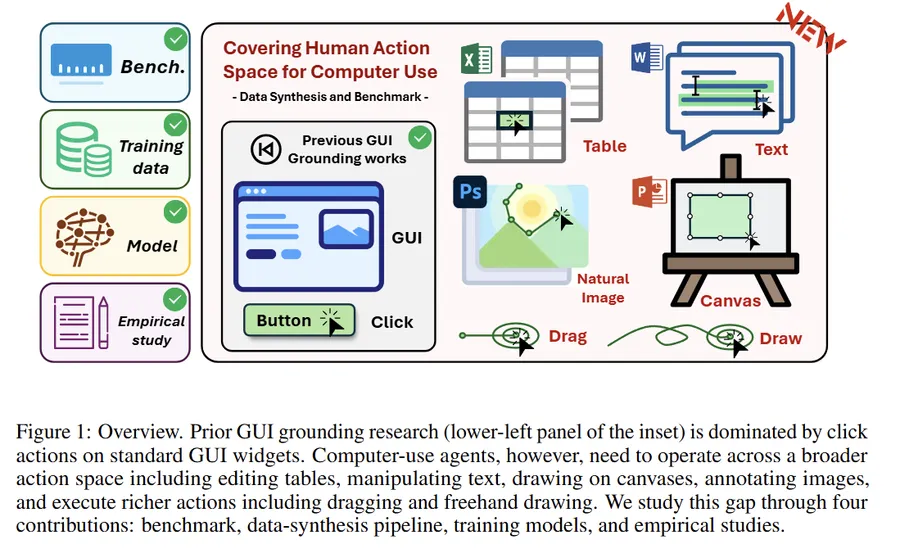
Microsoft Research describes GUI grounding as the perception system of a computer-use agent. That framing is useful. A planner can be strong, but if the final action lands on the wrong UI target, the entire workflow breaks.
This is why Phi-Ground-Any is interesting. It does not try to do everything. It focuses on the most failure-prone part of the stack: translating a user instruction into a reliable interaction point on screen.
The uncomfortable truth is that many agents do not fail because they cannot reason. They fail because they cannot point accurately.
Main results to pay attention to
In Microsoft’s Research article, the Phi-Ground family achieves state-of-the-art results across all five GUI grounding benchmarks among comparably sized models under 10B parameters.
The article specifically highlights:
- 55% on ScreenSpot-Pro
- 36.2% on UI-Vision
Microsoft also notes that current grounding models are still only around 65% successful overall, which is far from dependable everyday use. So the value of Phi-Ground-Any is not that it solves the problem completely. The value is that it improves one of the weakest links in the agent stack.
What makes Phi-Ground-Any different
Compared with a more traditional GUI grounding setup, Phi-Ground-Any has a few practical differences that matter.
First, it uses a larger 1680x1008 5x3-tile canvas. That helps when the target is a small icon, compact toolbar item, or narrow input region.
Second, Phi-Ground-Any uses instruction-first formatting. The model takes the user instruction directly, then the image, instead of wrapping the instruction in a longer description template.
Third, it outputs direct click points with <x> and <y> tags instead of only returning a bounding box. That makes it easier to connect to a real click executor in browser or desktop agent pipelines.
Three things to remember before using it
1. The resolution is fixed
Phi-Ground-Any requires strict preprocessing to 1680x1008:
target_width, target_height = 336 * 5, 336 * 3If you skip this and feed arbitrary screenshots directly, accuracy will likely degrade.
2. The input format is strict
Phi-Ground-Any uses direct instruction input, not a descriptive wrapper. The prompt structure is:
       <|user|>
{instruction}<|image_1|>
<|end|>
<|assistant|>
This is a specialized grounding model, so prompt formatting is part of performance, not just style.
3. The output is not final pixel coordinates
The <x> and <y> values are relative coordinates over the padded canvas, scaled to 10000.
In practice, you need to:
- map them back to the padded 1680x1008 canvas
- then divide by
reshape_ratioto recover coordinates on the original screenshot
If this conversion is wrong, your executor will still click the wrong place even when the model prediction itself is correct.
Quick start
The example setup uses dependencies such as:
       pip install \
  flash_attn==2.5.8 \
  numpy==1.24.4 \
  Pillow==10.3.0 \
  requests==2.31.0 \
  torch==2.3.0 \
  torchvision==0.18.0 \
  transformers==4.43.0 \
  accelerate==0.30.0
A practical starter example looks like this:
       from PIL import Image
import re
import torch
from transformers import AutoProcessor, AutoModelForCausalLM

MODEL_ID = "microsoft/Phi-Ground-Any"
TARGET_WIDTH, TARGET_HEIGHT = 336 * 5, 336 * 3  # 1680 x 1008
SCALE = 10000.0


def process_image(img: Image.Image):
    img_ratio = img.width / img.height
    target_ratio = TARGET_WIDTH / TARGET_HEIGHT

    if img_ratio > target_ratio:
        new_width = TARGET_WIDTH
        new_height = int(new_width / img_ratio)
    else:
        new_height = TARGET_HEIGHT
        new_width = int(new_height * img_ratio)

    reshape_ratio = new_width / img.width
    img = img.resize((new_width, new_height), Image.LANCZOS)

    canvas = Image.new("RGB", (TARGET_WIDTH, TARGET_HEIGHT), (255, 255, 255))
    canvas.paste(img, (0, 0))
    return canvas, reshape_ratio


def to_original_pixel(x_rel, y_rel, reshape_ratio):
    px = (x_rel / SCALE) * TARGET_WIDTH / reshape_ratio
    py = (y_rel / SCALE) * TARGET_HEIGHT / reshape_ratio
    return px, py

instruction = "Search box"
prompt = f"""<|user|>
{instruction}<|image_1|>
<|end|>
<|assistant|>"""

original_image = Image.open("screen.png").convert("RGB")
image, reshape_ratio = process_image(original_image)

processor = AutoProcessor.from_pretrained(MODEL_ID, trust_remote_code=True)
model = AutoModelForCausalLM.from_pretrained(
    MODEL_ID,
    trust_remote_code=True,
    torch_dtype=torch.bfloat16,
    device_map="auto",
)

inputs = processor(text=prompt, images=image, return_tensors="pt")
inputs = {k: v.to(model.device) if hasattr(v, "to") else v for k, v in inputs.items()}

outputs = model.generate(**inputs, max_new_tokens=64)
result = processor.batch_decode(outputs, skip_special_tokens=True)[0]
print(result)

x_match = re.search(r"<x>\s*(-?\d+(?:\.\d+)?)\s*</x>", result)
y_match = re.search(r"<y>\s*(-?\d+(?:\.\d+)?)\s*</y>", result)

if x_match and y_match:
    x_rel = float(x_match.group(1))
    y_rel = float(y_match.group(1))
    px, py = to_original_pixel(x_rel, y_rel, reshape_ratio)
    print(px, py)
Best way to use it
The most practical pattern is to treat Phi-Ground-Any as a specialized submodule:
- a larger model for planning and task understanding
- Phi-Ground-Any for UI target localization
- an executor for click, type, and scroll actions
- a state checker to verify whether the UI changed as expected
That architecture is less flashy than a single end-to-end demo, but it is often more reliable in production.
Final take
Phi-Ground-Any is a useful reminder that better agents do not always start with a bigger brain. Sometimes they start with better eyes and steadier hands.
If you are building browser agents, desktop automation, testing bots, or accessibility tools, this model is worth a serious look.
It is not a complete answer. But it targets an expensive, common, and underestimated failure mode: losing the whole workflow because the agent clicked the wrong place.
Links
More Articles






