
OpenAI Turned Codex Into a Mini Keyboard: $230, With Agent Reasoning Control
OpenAI and Work Louder introduced Codex Micro, a $230 desktop controller that brings Codex status lights, PR review, debug, refactor, accept/reject actions, and reasoning-level control into a physical device.
Published 95 days ago. Content may be outdated.
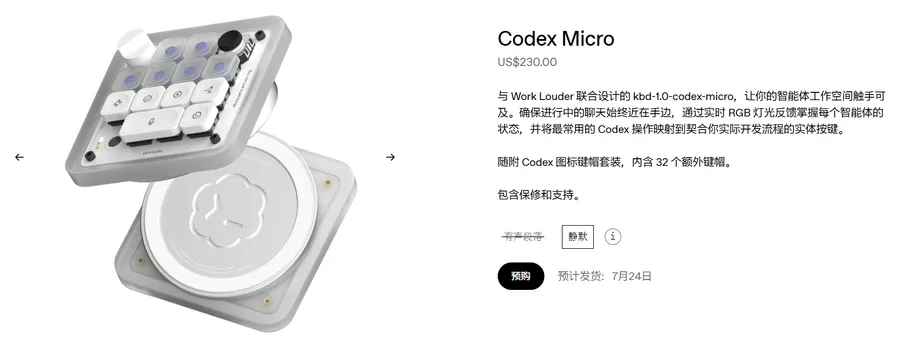
OpenAI Supply Co. and hardware studio Work Louder have introduced Codex Micro, a $230 collaboration device.
It looks like a compact mechanical keyboard, but it is not positioned as a normal shortcut pad. It is a Codex / agent workflow controller: check status, trigger tasks, accept or reject results, and even adjust an agent’s reasoning level with a knob.
30-Second Summary
- Product name: Codex Micro
- Collaboration: OpenAI Supply Co. x Work Louder
- Price: $230
- Positioning: a physical controller for Codex agent workflows
- Connectivity: Bluetooth / USB-C
- Compatibility: Mac / Windows
- Hardware: 13 mechanical switches, 1 touch sensor, 1 rotary encoder, 1 planar joystick
- Included: Creator Micro, USB-C cable, Codex icon keycap set
- Official page lists estimated shipping date: July 24
What Can It Do?
Codex Micro turns several high-frequency Codex actions into physical controls:
- check Codex status
- trigger workflows such as review PR, debug, and refactor
- accept or reject model suggestions
- start a new chat or use push-to-talk
- adjust reasoning level
These actions usually live inside software UI. OpenAI is pulling them onto the desk.
The Key Part: Agent Status Moves Out of the Screen
Codex Micro’s agent key uses RGB lighting to show Codex’s live state, including:
- idle
- thinking
- running
- waiting
- completed
That is useful because one of the common frustrations with agents is not knowing what they are doing: thinking, running, waiting for confirmation, or already done. Status lighting turns that hidden state into a visible physical signal.
The Joystick and Knob Are the Real Story
According to the official page, the planar joystick can trigger common Codex workflows such as:
- review PR
- debug
- refactor
The rotary encoder is even more interesting: it can adjust reasoning level in real time.
That is not a traditional IDE shortcut. Normal shortcuts control actions like save, search, and run. Codex Micro controls agent behavior: think deeper, answer faster, or spend more reasoning budget.
Command Keys: Accept, Reject, Voice, New Chat
Codex Micro command keys can map to common actions, including:
- accept
- reject
- push-to-talk
- new chat
These are the handoff points in human-agent collaboration: the model proposes, you confirm; the model runs, you take over; the context gets messy, you start a new chat.
Hardware Specs
| Item | Details |
|---|---|
| Product | Codex Micro |
| Collaboration | OpenAI Supply Co. x Work Louder |
| Price | $230 |
| Connectivity | Bluetooth / USB-C |
| Compatibility | Mac / Windows |
| Mechanical switches | 13 |
| Touch sensor | 1 |
| Rotary encoder | 1 |
| Planar joystick | 1 |
| Included | Creator Micro, USB-C cable, Codex icon keycap set |
| Estimated shipping | July 24 |
Why It Matters
Codex Micro may not become a mainstream hardware device, but it sends a clear product signal:
AI coding tools are moving from chat boxes toward development agents that can keep running, be monitored, and be controlled.
When tools like Codex read code, run tasks, and wait for confirmation in the background, users need better status feedback and control surfaces. Physical lighting, joystick-triggered workflows, and a reasoning-level knob are all pointing in that direction.
Conclusion
The most interesting thing about Codex Micro is not the number of keys. It is that it turns Codex’s agent workflow into a physical interaction language.
This may not be the final form of AI coding hardware, but the direction is clear: developers will not only call agents. They will manage them like active tools.
Source:
More Articles






