
LangChain Open Canvas: A Self-Hosted Alternative to OpenAI Canvas
Learn how to deploy LangChain Open Canvas - a powerful open-source alternative to OpenAI Canvas for AI writing and coding. Step-by-step guide for installation and private deployment of your own AI platform.
Published 653 days ago. Content may be outdated.
Introduction
In today’s rapidly evolving AI landscape, efficiently leveraging Large Language Models (LLMs) for writing and programming has become a crucial challenge. LangChain Open Canvas, as an open-source AI collaboration platform, offers excellent user experience and rich features, making AI-assisted creation simpler and more efficient.
This article will detail the core features of LangChain Open Canvas and guide you through private deployment.
💡 If you’re looking to build your own AI-assisted writing and programming platform, LangChain Open Canvas is an ideal choice.
Why Choose LangChain Open Canvas?
LangChain Open Canvas offers these outstanding advantages:
- 🔓 Fully open-source, MIT licensed
- 💭 Built-in memory system
- 📝 Support for starting from existing documents
- 🔄 Version control support
- 🛠️ Custom quick actions
- 📊 Real-time Markdown rendering
- 💻 Code and document editing support
Core Features
| Feature Module | Key Capabilities |
|---|---|
| Smart Memory System | • Automatic reflection and memory generation • Cross-session personalization • History-based response optimization |
| Quick Action Support | • Custom persistent prompts • Pre-configured writing/programming tasks • One-click triggers |
| Document Version Control | • Complete version history • Instant version rollback • Document evolution tracking |
| Multi-format Support | • Real-time Markdown preview • Code editor integration • Mixed content editing |
System Requirements
Requirements for deploying Open Canvas:
| Requirement | Description |
|---|---|
| Package Manager | Yarn |
| LLM API | OpenAI, Anthropic, etc. |
| Authentication | Supabase |
| Runtime | Node.js 18+ |
| Memory | 4GB+ |
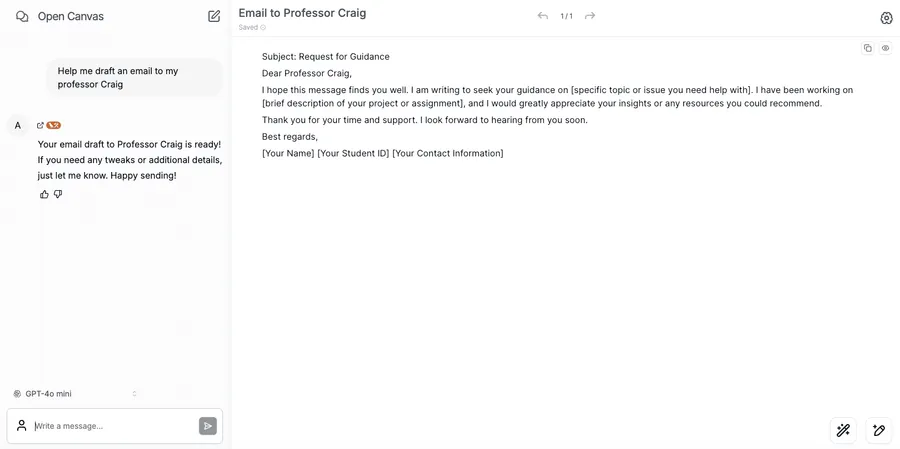
Online Demo
Basic Installation
1. Clone Repository
       git clone https://github.com/langchain-ai/open-canvas.git
cd open-canvas
2. Install Dependencies
yarn install3. Environment Setup
Create .env file:
cp .env.example .envConfigure essential environment variables:
       # LLM API Keys
OPENAI_API_KEY=sk-xxx
ANTHROPIC_API_KEY=sk-xxx

# Supabase Configuration
NEXT_PUBLIC_SUPABASE_URL=your-project-url
NEXT_PUBLIC_SUPABASE_ANON_KEY=your-anon-key

# LangGraph Configuration
LANGSMITH_API_KEY=ls-xxx
Authentication Setup
1. Supabase Configuration
- Create a Supabase project
- Configure authentication providers:
- Enable Email authentication
- Optionally configure GitHub/Google login
- Copy project URL and API keys
2. Verify Configuration
       # Start development server
yarn dev

# Visit http://localhost:3000 to test login
LangGraph Service Setup
1. Install LangGraph CLI
Follow the installation guide in the LangGraph documentation.
2. Start Service
LANGSMITH_API_KEY="your-key" langgraph up --watch --port 543673. Verify Status
Visit http://localhost:54367/docs to check API documentation.
LLM Model Configuration
Open Canvas supports various LLM models:
1. Online Models
       # Supported Models
- Anthropic Claude 3 Haiku
- Fireworks Llama 3 70B
- OpenAI GPT-4
2. Local Ollama Models
Enable local model support:
       # .env configuration
NEXT_PUBLIC_OLLAMA_ENABLED=true
OLLAMA_API_URL=http://host.docker.internal:11434
Practical Features Configuration
1. Custom Quick Actions
       // Add in src/config/quickActions.ts
export const customQuickActions = [
  {
    name: "Optimize Code",
    prompt: "Please optimize this code for performance and readability:",
    type: "code"
  }
];
2. Memory System Configuration
       memory:
  enabled: true
  maxTokens: 2000
  relevanceThreshold: 0.8
Performance Optimization Tips
- Use production-grade LLM APIs
- Configure appropriate caching strategies
- Optimize frontend resource loading
- Use CDN for static assets
Summary
Open Canvas provides a feature-complete AI-assisted creation platform. Through this deployment guide, you can quickly set up your own private environment. Its open-source nature and rich features make it an ideal choice for team collaboration.
References
More Articles






