
GLM-4.7 Newly Released: Coding Agent Quickstart (transformers/vLLM/SGLang/Thinking)
GLM-4.7 just launched with stronger agentic coding, tool calling and reasoning. This quick guide covers transformers inference, vLLM/SGLang local serving (OpenAI-style API), plus Thinking/Preserved Thinking switches and key params.
Published 300 days ago. Content may be outdated.
If you’ve been watching the “coding agent / coding copilot” space, GLM-4.7 is worth a quick look.
According to the Hugging Face README, the focus of this release is pretty clear:
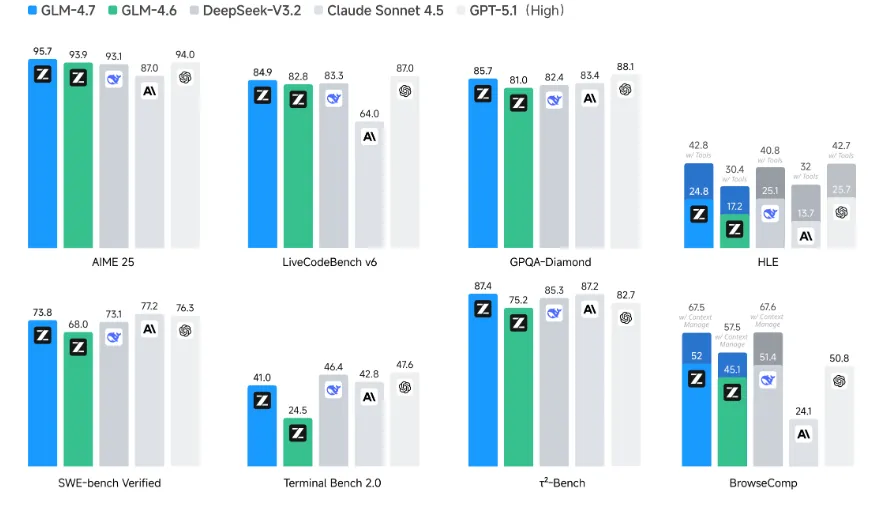
- Stronger delivery for coding: multilingual agentic coding + terminal tasks are more stable
- Better tool use: improved tool calling for workflow-style tasks
- Stronger reasoning: a notable bump for complex reasoning/math
Below is an “overview + quickstart” style guide that you can copy and run.
What you’ll get (read this first)
- A minimal, runnable transformers snippet: get inference working first
- Two local serving options: vLLM / SGLang commands you can copy
- Thinking mode switches: when to enable it, and how to disable per request
- Practical params + a quick troubleshooting checklist: fewer retries, less time wasted
Who this is for
- You want to plug
GLM-4.7into yourIDE/Coding Agentworkflow (edit repo, run commands, read logs) - You want a local / intranet OpenAI-style API for your team
- You want more stable “tool calling + multi-turn” agent workflows
Quick navigation
- Run inference first: see “Quickstart: transformers local inference”
- Serve an API: see “Serve locally with vLLM / SGLang”
- Thinking switches: see “Thinking mode: how to enable/disable (and when)”
3-minute overview: what’s improved?
1) More reliable coding agents: agentic coding + terminal tasks
The key signal from the README is: GLM-4.7 improves on software-engineering and terminal-task benchmarks, and it’s better suited for multi-step flows where the model “thinks before acting”.
In practice, that usually means:
- Easier to use in coding-agent loops that modify repos, run commands, and parse logs
- Less drift across multi-turn tasks (fewer “it said A earlier, now it says B” moments)
2) Better “vibe coding”: UI/pages/slides look more production-ready
If you often ask models to generate webpages or simple demos, the README highlights improvements in layout, sizing, and modern UI style—i.e., outputs tend to look more like something you can actually show.
3) Better tool calling: more workflow-friendly
For tasks that involve browsing, retrieval, or calling internal systems, the README mentions stronger tool use. In integration, it’s recommended to use OpenAI-style tool schema formatting for best compatibility.
4) More flexible Thinking: Interleaved / Preserved / Turn-level
GLM-4.7 continues to improve Interleaved Thinking (thinking before responses and tool calls) and adds:
- Preserved Thinking: in coding-agent scenarios, the model keeps thinking blocks across turns to reduce inconsistency
- Turn-level Thinking: per-turn control—disable for simple requests to reduce latency/cost, enable for complex tasks
More details:
Quickstart: transformers local inference
The README mentions pairing with transformers==4.57.3.
Here is a minimal runnable snippet:
       import torch
from transformers import AutoModelForCausalLM, AutoTokenizer

MODEL_PATH = "zai-org/GLM-4.7"

messages = [
  {"role": "user", "content": "hello"}
]

tokenizer = AutoTokenizer.from_pretrained(MODEL_PATH)

inputs = tokenizer.apply_chat_template(
  messages,
  tokenize=True,
  add_generation_prompt=True,
  return_dict=True,
  return_tensors="pt",
)

model = AutoModelForCausalLM.from_pretrained(
  pretrained_model_name_or_path=MODEL_PATH,
  torch_dtype=torch.bfloat16,
  device_map="auto",
)

inputs = inputs.to(model.device)

generated_ids = model.generate(
  **inputs,
  max_new_tokens=128,
  do_sample=False,
)

output_text = tokenizer.decode(generated_ids[0][inputs.input_ids.shape[1] :])
print(output_text)
Practical tips:
- If you need reproducible outputs, start with
do_sample=Falseor fix random seeds - Large generation limits (the README shows very large max token defaults) can heavily increase VRAM usage and latency—set limits based on your real output needs
Serve locally with vLLM / SGLang
The README notes that vLLM and SGLang need their main branches (or nightly/dev images) for best GLM-4.7 support.
1) vLLM: install + run (copy-paste)
Docker:
docker pull vllm/vllm-openai:nightlypip (the README emphasizes using pypi.org as index):
pip install -U vllm --pre --index-url https://pypi.org/simple --extra-index-url https://wheels.vllm.ai/nightlyServe (README example, includes tool/reasoning parser and auto tool choice):
       vllm serve zai-org/GLM-4.7-FP8 \
  --tensor-parallel-size 4 \
  --speculative-config.method mtp \
  --speculative-config.num_speculative_tokens 1 \
  --tool-call-parser glm47 \
  --reasoning-parser glm45 \
  --enable-auto-tool-choice \
  --served-model-name glm-4.7-fp8
2) SGLang: install + run (copy-paste)
Docker:
docker pull lmsysorg/sglang:devLaunch (README example):
       python3 -m sglang.launch_server \
  --model-path zai-org/GLM-4.7-FP8 \
  --tp-size 8 \
  --tool-call-parser glm47 \
  --reasoning-parser glm45 \
  --speculative-algorithm EAGLE \
  --speculative-num-steps 3 \
  --speculative-eagle-topk 1 \
  --speculative-num-draft-tokens 4 \
  --mem-fraction-static 0.8 \
  --served-model-name glm-4.7-fp8 \
  --host 0.0.0.0 \
  --port 8000
Note: the above is tuned for higher-performance inference; adjust for your GPU memory, concurrency, and whether you want speculative decoding.
Thinking mode: how to enable/disable (and when)
1) Recommendation: enable Preserved Thinking for multi-turn agent tasks
The README suggests enabling Preserved Thinking for multi-turn agentic tasks (e.g., τ²-Bench, Terminal Bench, SWE-bench-style multi-step tasks).
SGLang can enable it via config (README example):
       "chat_template_kwargs": {
  "enable_thinking": true,
  "clear_thinking": false
}
2) Want lower latency? Disable Thinking per request
The README notes thinking is enabled by default for requests in vLLM/SGLang; to disable it you can add:
extra_body={"chat_template_kwargs": {"enable_thinking": False}}Practical rule of thumb:
- Coding / workflows / multi-tool tasks: keep thinking on
- Simple Q&A / formatting / translation: you can turn it off for better throughput
Parameter suggestions: default vs evaluation-oriented
The README provides common parameter presets:
Default (most tasks)
temperature: 1.0top_p: 0.95max_new_tokens: 131072
Terminal / SWE-bench style tasks (more stable)
temperature: 0.7top_p: 1.0max_new_tokens: 16384
τ²-Bench
temperature: 0max_new_tokens: 16384
Practical deployment advice:
- Don’t blindly set
max_new_tokensto 131072 in production—set a realistic cap - For “must-deliver” coding tasks, reduce randomness (lower
temperatureor disable sampling)
Tool calling integration tips (avoid common pitfalls)
The README notes both vLLM and SGLang support tool calling, and suggests OpenAI-style tool descriptions.
Two practical tips:
- Make tool schemas strict: types and required fields should be explicit
- Make tool outputs traceable: include
source,id,timestampso multi-turn agents can reference results reliably
Troubleshooting checklist
- Framework version: vLLM/SGLang need main/nightly/dev; wrong versions can fail to load or behave oddly
- FP8 weights: examples use
GLM-4.7-FP8; ensure your hardware/framework supports FP8 - Thinking output handling: if you display model output to end users, separate “thinking” from final answers
- Multi-turn stability: for long tasks, enable
Preserved Thinkingand keep concise task-state summaries in your agent layer
Links
- Hugging Face README:
- Thinking Mode docs:
- Official GitHub:
More Articles







Related Posts
No related posts yet