
DeepSeek OCR App: React+FastAPI Text Recognition | 4 Modes + Docker
DeepSeek OCR App: Open-source React+FastAPI text recognition tool with 4 OCR modes - plain text, image description, content search & custom prompts. Docker deployment, GPU acceleration, drag-drop upload. Complete tutorial for developers and enterprises.
Published 362 days ago. Content may be outdated.
What is DeepSeek OCR App?
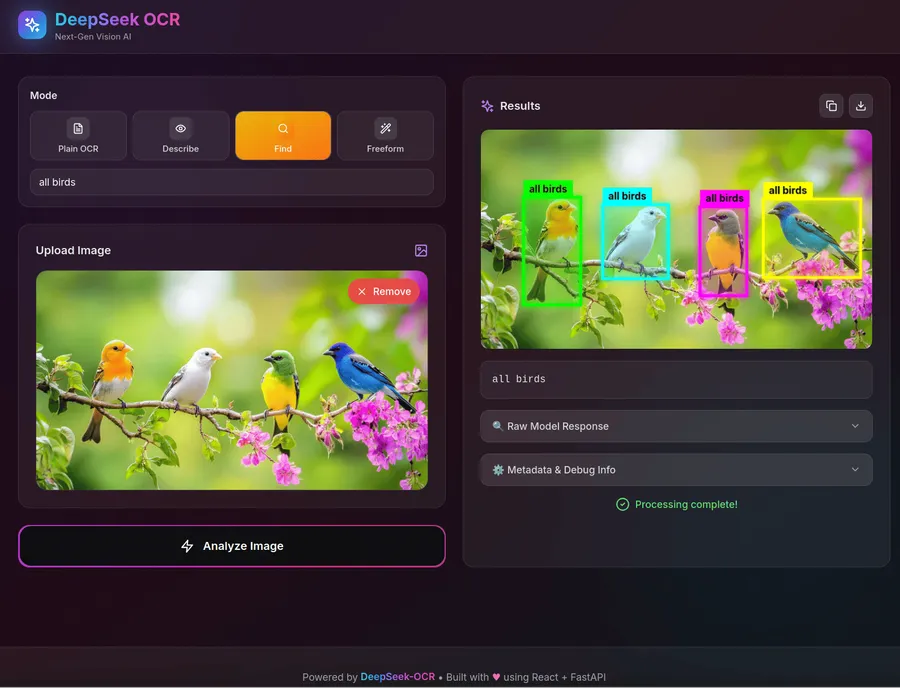
Simply put, DeepSeek OCR App is a very practical text recognition web application. It uses React for the frontend interface and FastAPI for the backend service, with a pretty modern architecture overall. The key feature is the integration of the DeepSeek-OCR recognition model, delivering good performance in both interface design and processing speed.
Beyond basic text recognition, this application can also describe image content, find specific text, and even handle custom processing requirements. Overall, it’s a fairly comprehensive document processing tool.
💡 If you happen to need an OCR application, this project is basically ready to use out of the box, with both frontend and backend prepared for you.
Core Features and Functionality
🎯 Four OCR Modes
This application provides four different recognition approaches:
- Plain OCR (Pure Text Recognition): The most basic text extraction, pulling out all the text from images
- Describe (Smart Description): Let AI look at images and tell you what the content is about
- Find (Content Search): Find specific text and mark it with bounding boxes to show where it is
- Freeform (Custom Mode): You can write your own prompts and let it process according to your requirements
🎨 Pretty Good Interface Design
The frontend design is quite thoughtful:
- Glass Morphism Design: Looks quite modern with that semi-transparent effect
- Drag & Drop Upload: Just drag files in, supports up to 100MB
- File Management: Can delete and re-upload with one click if not satisfied
- Bounding Box Annotation: Found text gets marked with boxes, coordinates are quite accurate
- Animation Effects: Uses Framer Motion, interactions feel smooth
- Result Processing: Can directly copy or download after recognition
- Settings Panel: Has a collapsible advanced options panel, expand when needed
- Multiple Formats: Results can be displayed in HTML or Markdown format
⚡ Decent Backend Performance
- Model Inference: Uses PyTorch + Transformers 4.46 combination
- GPU Acceleration: Supports NVIDIA graphics cards, tested RTX 3090 and 5090 without issues
- Multi-box Processing: Can annotate multiple regions simultaneously, format is
[[x1,y1,x2,y2], [x1,y1,x2,y2]] - Coordinate Conversion: Converts normalized coordinates (0-999) to actual pixel positions
- Configuration Management: Uses python-decouple for environment variable management, quite flexible
Technical Architecture Deep Dive
🛠️ Technology Stack
Frontend Tech Stack
- React 18: Latest version of React framework
- Vite 5: Modern build tool providing fast development experience
- TailwindCSS 3: Utility-first CSS framework
- Framer Motion 11: Powerful animation and interaction library
Backend Tech Stack
- FastAPI: High-performance Python web framework
- PyTorch: Deep learning inference engine
- Transformers 4.46: Hugging Face model library
- DeepSeek-OCR: Core OCR recognition model
Deployment & Operations
- Docker + Docker Compose: Containerized deployment solution
- Nginx: Reverse proxy server
- Multi-stage builds: Optimized Docker image build process
📁 Project Structure
       deepseek-ocr/
├── backend/              # FastAPI backend service
│   ├── main.py          # Main application entry
│   ├── requirements.txt # Python dependencies
│   └── Dockerfile       # Backend container config
├── frontend/            # React frontend application
│   ├── src/
│   │   ├── components/  # React components
│   │   ├── App.jsx     # Main application component
│   │   └── main.jsx    # Application entry
│   ├── package.json    # Node.js dependencies
│   ├── nginx.conf      # Nginx configuration
│   └── Dockerfile      # Frontend container config
├── models/             # Model cache directory
└── docker-compose.yml  # Container orchestration config
How to Get Started Quickly?
🐳 Using Docker is Most Convenient
If you don’t want to mess with environments, using Docker Compose directly is the simplest:
       # Clone the project repository
git clone https://github.com/rdumasia303/deepseek_ocr_app.git
cd deepseek_ocr_app

# One-click service startup
docker compose up --build
⚙️ Environment Configuration
Hardware Requirements
Running this application has some requirements for your computer:
- Graphics Card: Best to have an 8-12GB VRAM NVIDIA card (recommended RTX 3090, RTX 4090, RTX 5090)
- Memory: 16GB RAM is safer
- Storage: Leave at least 20GB space for model files and Docker images
- Network: First startup needs to download models (about 5-10GB), network should be stable
⚠️ Special Note for RTX 5090 Ubuntu Users:
If you’re using RTX 5090 graphics card on Ubuntu 24.04, driver installation is quite tricky and requires special attention:
Key Requirements:
- Must use open-source drivers (nvidia-driver-580-open or newer)
- Upgrade kernel to 6.11+ (recommended 6.14+ for better stability)
- Must enable Resize Bar in BIOS/UEFI (this is crucial!)
Quick Installation Steps:
       # 1. Install open-source drivers
sudo add-apt-repository ppa:graphics-drivers/ppa
sudo apt update
sudo apt remove --purge nvidia*
sudo apt install nvidia-driver-580-open

# 2. Upgrade kernel
sudo apt install --install-recommends linux-generic-hwe-24.04
sudo update-initramfs -u

# 3. Reboot and enter BIOS to enable Resize Bar
# 4. Verify installation
nvidia-smi
Without enabling Resize Bar, you might get a black screen - this is a special requirement for Blackwell GPUs.
Software Requirements
- Docker: 20.10+ version
- Docker Compose: 2.0+ version
- NVIDIA Docker: GPU container runtime support (optional)
🔧 Environment Variable Configuration
Create a .env file for custom configuration:
       # Service port configuration
BACKEND_PORT=8000
FRONTEND_PORT=3000

# File upload limits
MAX_UPLOAD_SIZE=100MB

# GPU device configuration
CUDA_VISIBLE_DEVICES=0

# Model configuration
MODEL_CACHE_DIR=./models
Usage Tutorial
📤 How to Upload Files
- Drag & Drop Upload: Simplest way, just drag images to the upload area
- Click Upload: If not used to dragging, clicking the button to select files works too
- Supported Formats: JPG, PNG, BMP, GIF - all common formats are supported
- File Size: Default maximum 100MB, sufficient for general images
🎛️ OCR Mode Selection
Plain OCR Mode
       Purpose: Extract all text content from images
Use Cases: Document digitization, text input, content extraction
Output Format: Plain text string
Describe Mode
       Purpose: Generate intelligent image descriptions
Use Cases: Image annotation, content analysis, accessibility features
Output Format: Natural language description
Find Mode
       Purpose: Locate specific content and mark positions
Use Cases: Key information location, content retrieval, quality checking
Output Format: Text + bounding box coordinates
Freeform Mode
       Purpose: Custom prompt processing
Use Cases: Specialized tasks, special requirements, flexible processing
Output Format: Customized based on prompts
📊 Result Processing
After processing is complete, the application provides various result management features:
- Text Copy: One-click copy recognition results to clipboard
- File Download: Save results as text files
- Bounding Box Visualization: Display recognition areas on original image
- Formatted Display: Support HTML and Markdown rendering
API Usage Guide
🔌 REST API Interface
DeepSeek OCR App provides standard REST API interfaces:
POST /api/ocr
Request Format:
       curl -X POST "http://localhost:8000/api/ocr" \
  -F "file=@your_image.jpg" \
  -F "mode=plain" \
  -F "custom_prompt=your_custom_prompt"
Parameter Description:
file: Image file (required)mode: OCR mode (plain/describe/find/freeform)custom_prompt: Custom prompt (used in freeform mode)find_text: Target text to find (used in find mode)
Response Format:
       {
  "success": true,
  "result": {
    "text": "Recognized text content",
    "bounding_boxes": [[x1, y1, x2, y2]],
    "confidence": 0.95,
    "processing_time": 1.23
  }
}
🐍 Python SDK Integration
       import requests

def ocr_request(image_path, mode="plain", custom_prompt=None):
    """
    Call DeepSeek OCR API

    Args:
        image_path: Image file path
        mode: OCR mode
        custom_prompt: Custom prompt

    Returns:
        dict: API response result
    """
    url = "http://localhost:8000/api/ocr"

    files = {"file": open(image_path, "rb")}
    data = {"mode": mode}

    if custom_prompt:
        data["custom_prompt"] = custom_prompt

    response = requests.post(url, files=files, data=data)
    return response.json()

# Usage example
result = ocr_request("document.jpg", mode="describe")
print(result["result"]["text"])
Development and Customization
🔨 Want to Modify the Code?
If you want to modify something based on this:
Backend Development
       # Enter backend directory
cd backend

# Create virtual environment
python -m venv venv
source venv/bin/activate  # Linux/Mac
# venv\Scripts\activate   # Windows

# Install dependencies
pip install -r requirements.txt

# Start development server
uvicorn main:app --reload --host 0.0.0.0 --port 8000
Frontend Development
       # Enter frontend directory
cd frontend

# Install dependencies (recommended to use yarn or pnpm)
yarn install
# or pnpm install

# Start development server
yarn dev
# or pnpm dev
🎨 Interface Customization
The frontend uses TailwindCSS, making it easy to customize styles:
       // Modify theme colors
const customTheme = {
  primary: '#your-color',
  secondary: '#your-secondary-color',
  background: 'your-background'
}

// Custom component styles
<div className="bg-gradient-to-r from-blue-500 to-purple-600">
  {/* Your content */}
</div>
🔧 Feature Extension
You can extend functionality in the following ways:
- Add new OCR modes: Add new processing logic in backend
main.py - Integrate other models: Replace or add different OCR models
- Enhance UI components: Add new interactive features in frontend
- API feature extension: Add batch processing, asynchronous tasks, etc.
Troubleshooting
⚠️ What to Do When Encountering Problems
GPU Detection Issues
       # Check NVIDIA drivers
nvidia-smi

# Check Docker GPU support
docker run --rm --gpus all nvidia/cuda:11.0-base nvidia-smi
Port Conflicts
       # Check port usage
netstat -tulpn | grep :8000

# Modify port configuration
# Modify port mapping in docker-compose.yml
Frontend Build Issues
       # Clean cache
yarn cache clean
# or pnpm store prune

# Reinstall dependencies
rm -rf node_modules package-lock.json
yarn install
Model Download Issues
       # Manually download models to models directory
# Or configure proxy environment variables
export HTTP_PROXY=http://your-proxy:port
export HTTPS_PROXY=http://your-proxy:port
Performance Optimization Recommendations
🚀 Deployment Optimization
-
GPU Memory Management
- Set reasonable batch processing sizes
- Use model quantization to reduce VRAM usage
- Configure memory cleanup strategies
-
Network Optimization
- Enable gzip compression
- Configure CDN acceleration
- Optimize image upload sizes
-
Caching Strategies
- Enable model caching
- Configure result caching
- Use Redis for frequent request caching
📈 Monitoring and Logging
       # Add monitoring in docker-compose.yml
services:
  app:
    logging:
      driver: "json-file"
      options:
        max-size: "10m"
        max-file: "3"
Final Thoughts
Overall, DeepSeek OCR App is a quite practical OCR tool. The tech stack uses React + FastAPI, the interface is well-designed, functionality is sufficient, and deployment isn’t too troublesome.
Main Advantages:
- 🎯 Sufficient Functionality: Four modes basically cover common needs
- 🎨 Good Interface: Glass morphism design, looks quite modern
- ⚡ Decent Performance: Has GPU acceleration, acceptable speed
- 🐳 Simple Deployment: Docker one-click startup, convenient
- 🔧 Easy to Modify: Clear project structure, not difficult to modify things
Whether you’re using it personally, deploying it for a company, or want to modify something based on this, this project is a good starting point. Plus the author is still continuously updating it, so it should become increasingly useful.
References
More Articles







Related Posts
No related posts yet