Complete MediaMTX Streaming Server Deployment Guide: From Basics to Production
A comprehensive guide to setting up MediaMTX streaming server with support for SRT/WebRTC/RTSP/RTMP/HLS protocols. Learn installation, configuration, performance optimization, and protocol support to deploy a professional-grade streaming system.
Published 685 days ago. Content may be outdated.
Introduction
In today’s digital age, streaming services have become essential for various applications. Whether it’s live video streaming, security surveillance, or remote education, a stable and efficient streaming server is crucial. MediaMTX (formerly rtsp-simple-server) is a powerful open-source streaming server that offers multi-protocol support and flexible deployment options.
This guide will walk you through deploying and using MediaMTX to quickly set up a professional-grade streaming system.
💡 If you need a multi-protocol streaming server, MediaMTX is an ideal choice.
Why Choose MediaMTX?
Among various streaming server solutions, MediaMTX stands out with these advantages:
- 🚀 Zero-dependency deployment, single binary
- 💾 Multiple streaming protocol support
- 🔄 Automatic protocol conversion
- 🛠️ Recording and playback support
- 🔒 Built-in authentication
- 📊 Prometheus monitoring support
- 🌐 Cross-platform support (Linux/Windows/macOS)
Core Features
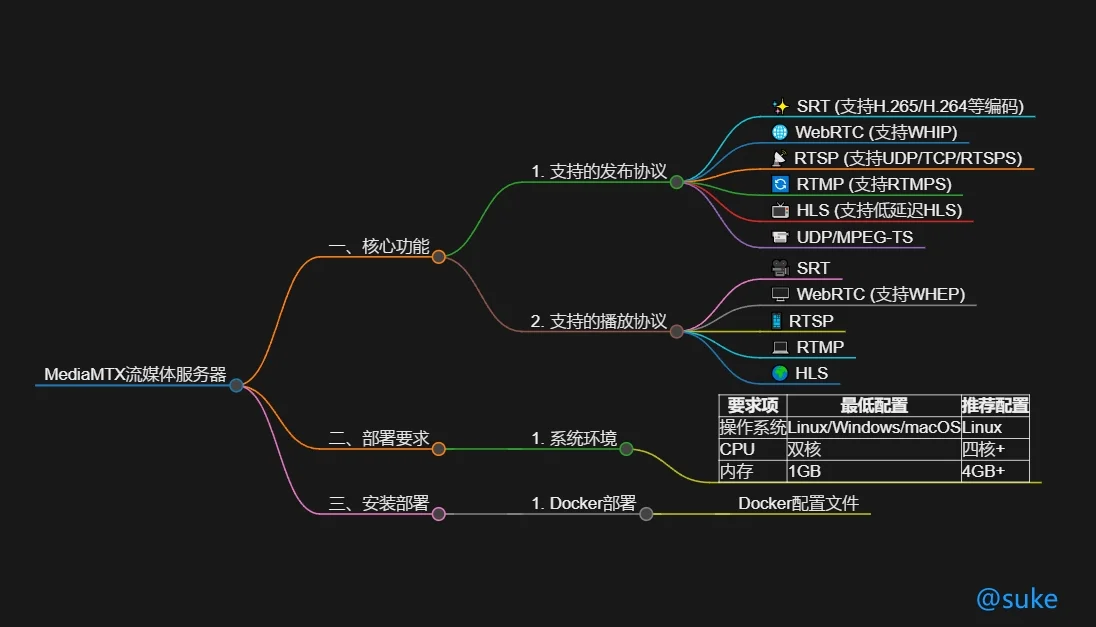
MediaMTX offers a rich set of features:
Publishing Protocols
- ✨ SRT (supports H.265/H.264 codecs)
- 🌐 WebRTC (with WHIP support)
- 📡 RTSP (UDP/TCP/RTSPS)
- 🔄 RTMP (with RTMPS)
- 📺 HLS (with Low-Latency HLS)
- 📹 UDP/MPEG-TS
Playback Protocols
- 🎥 SRT
- 🖥️ WebRTC (with WHEP support)
- 📱 RTSP
- 💻 RTMP
- 🌍 HLS
System Requirements
Before deployment, ensure your system meets these requirements:
| Requirement | Minimum | Recommended |
|---|---|---|
| OS | Linux/Windows/macOS | Linux |
| CPU | Dual Core | Quad Core+ |
| Memory | 1GB | 4GB+ |
Basic Installation
1. Docker Deployment
Create a docker-compose.yml file:
       version: '3'
services:
  mediamtx:
    image: bluenviron/mediamtx:latest
    container_name: mediamtx
    network_mode: host  # Recommended
    volumes:
      - ./mediamtx.yml:/mediamtx.yml
    restart: unless-stopped
2. Start the Service
docker-compose up -d3. Verify Installation
Access http://localhost:9997/v3/paths/list to check if the API responds correctly.
Core Configuration
Basic Configuration Example
Create mediamtx.yml:
       # API Configuration
api: yes
apiAddress: :9997

# RTSP Configuration
rtspAddress: :8554
protocols: [tcp, udp]
rtspsAddress: :8322

# RTMP Configuration
rtmpAddress: :1935
rtmpsAddress: :1936

# HLS Configuration
hlsAddress: :8888
hlsAlwaysRemux: yes
hlsSegmentCount: 3
hlsSegmentDuration: 1s
References
Enable user-based authentication:
       authInternalUsers:
  - user: admin
    pass: admin123
    permissions:
    - action: publish
    - action: read
Recording Function
Configure stream recording:
       pathDefaults:
  record: yes
  recordPath: ./recordings/%path/%Y-%m-%d_%H-%M-%S-%f
  ## Can be mp4 or mpegts (ts fragments)
  recordFormat: fmp4
Practical Configuration
1. CCTV Access
       paths:
  cam1:
    source: rtsp://admin:[email protected]/stream1
    sourceOnDemand: yes
2. Push Streaming
       paths:
  live:
    runOnInit: ffmpeg -re -i source.mp4 -c copy -f rtsp rtsp://localhost:$RTSP_PORT/$MTX_PATH
    runOnInitRestart: yes
3. Protocol Conversion
       paths:
  convert:
    source: rtsp://original-source
    # Automatically converted to other protocols (RTMP/HLS/WebRTC)
Push/Pull Streaming Examples
SRT Protocol Push/Pull
SRT (Secure Reliable Transport) is an open-source video transmission protocol suitable for transmitting low-latency video streams over unstable networks.
Basic Format
       # SRT URL format
srt://host:port?streamid=publish/read:streamname:username:password&pkt_size=1316
Push Streaming Example
       # Push video file using FFmpeg
ffmpeg -re -i input.mp4 -c:v h264 -c:a aac -f mpegts \
"srt://localhost:8890?streamid=publish:s1001&pkt_size=1316"

# Push streaming with authentication
ffmpeg -re -i input.mp4 -c:v h264 -c:a aac -f mpegts \
"srt://localhost:8890?streamid=publish:s1001:admin:password&pkt_size=1316"
Pull Streaming Example
       # Play using FFplay
ffplay "srt://localhost:8890?streamid=read:s1001&pkt_size=1316"

# Pull streaming and transcode using FFmpeg
ffmpeg -i "srt://localhost:8890?streamid=read:s1001&pkt_size=1316" \
-c:v h264 -c:a aac output.mp4
RTSP Protocol Push/Pull
RTSP is one of the most commonly used streaming protocols, especially suitable for security monitoring scenarios.
Push Streaming Example
       # Loop push video file
ffmpeg -re -stream_loop -1 -i input.mp4 -c:v copy -c:a aac \
-f rtsp rtsp://localhost:8554/live

# Push camera screen
ffmpeg -f v4l2 -i /dev/video0 -c:v h264 -f rtsp \
rtsp://localhost:8554/camera1
Pull Streaming Example
       # Play using FFplay
ffplay rtsp://localhost:8554/live

# Play using VLC
vlc rtsp://localhost:8554/live
WebRTC Push/Pull
WebRTC supports low-latency video transmission through browsers.
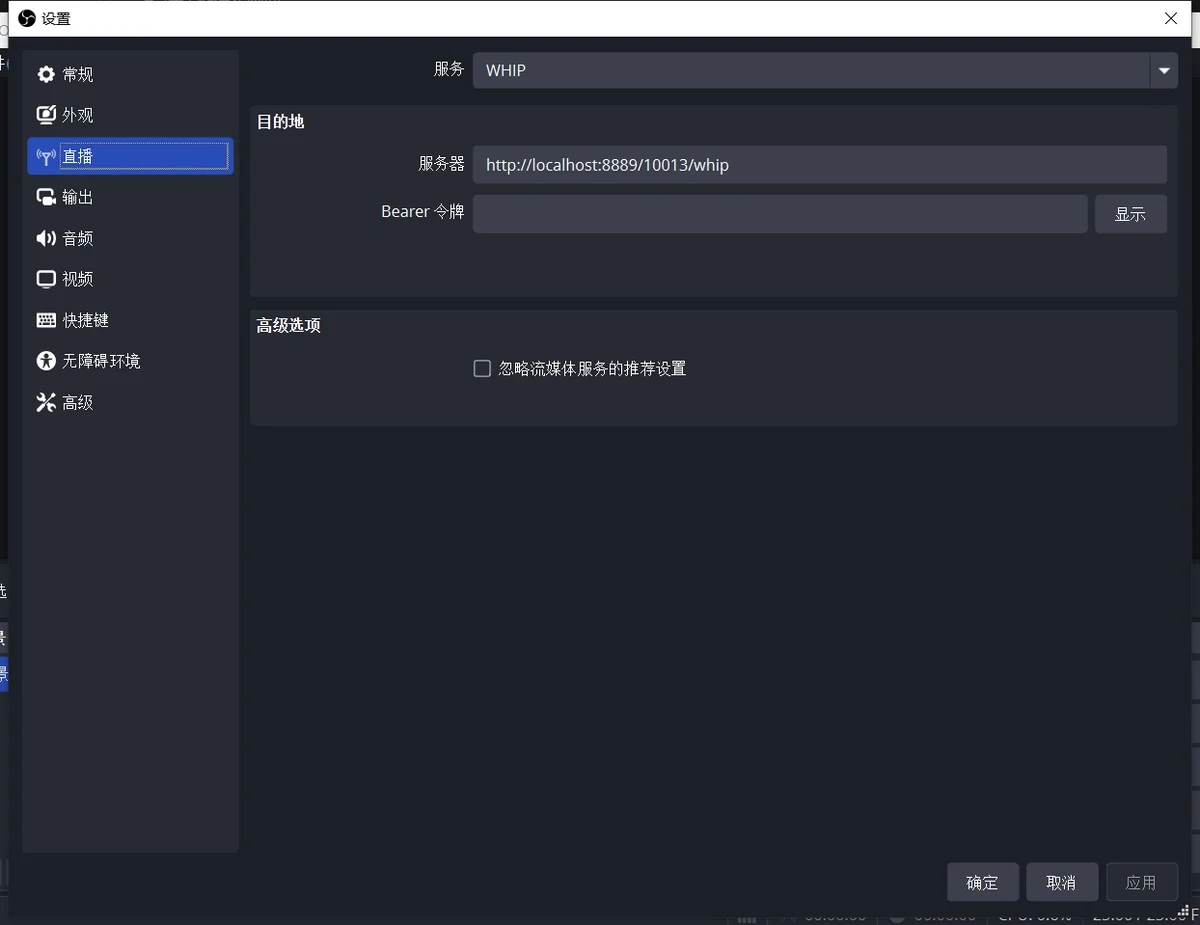
OBS Push Streaming Configuration
- Open OBS Studio latest version
- Add new streaming server
- Select WHIP protocol
- Server URL:
http://your-ip:8889/streamkey/whip
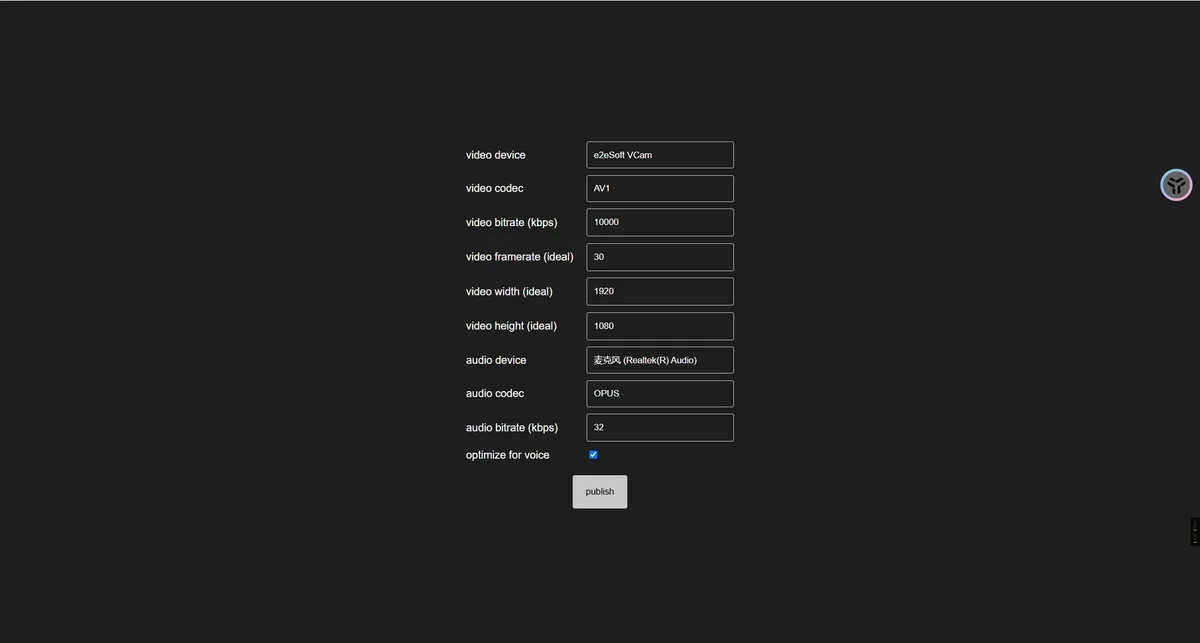
Browser Push Streaming
- Access
http://your-ip:8889/streamkey/publish - Allow browser to use camera and microphone
- 点击”Start Publishing”开始推流
Pull Streaming
-
OBS Pull Streaming
- RTSP protocol:
rtsp://your-ip:8554/streamkey
- RTSP protocol:
-
Browser Pull Streaming
- WebRTC:
http://your-ip:8889/streamkey - HLS:
http://your-ip:8888/streamkey
- WebRTC:
RTMP Push/Pull
RTMP is still one of the most commonly used protocols for live streaming.
Push Streaming Example
       # Push streaming using FFmpeg
ffmpeg -re -i input.mp4 -c:v h264 -c:a aac -f flv \
rtmp://localhost:1935/live/stream1

# OBS Push Streaming Configuration
Server: rtmp://localhost:1935/live
Stream key: stream1
Pull Streaming Example
       # Pull streaming using FFmpeg
ffplay rtmp://localhost:1935/live/stream1

# Play using VLC
vlc rtmp://localhost:1935/live/stream1
Multi-protocol Conversion Example
MediaMTX supports automatic protocol conversion, configuration example:
       paths:
  live:
    # Support access to the same stream through all protocols
    source: rtsp://camera-source/streamkey
    # Accessible via the following methods:
    # RTSP: rtsp://localhost:8554/streamkey
    # RTMP: rtmp://localhost:1935/streamkey
    # HLS:  http://localhost:8888/streamkey
    # WebRTC: http://localhost:8889/streamkey
💡 Tip: When actually used, please replace localhost with your server IP address.
Performance Optimization
1. System Parameter Optimization
       # Improve concurrency performance
readBufferSize: 4096
writeQueueSize: 4096
udpMaxPayloadSize: 1472
2. Network Optimization
       # Enable TCP mode to improve stability
protocols: [tcp]

# WebRTC Optimization
webrtcICEServers2:
  - url: stun:stun.l.google.com:19302
Monitoring and Maintenance
1. Prometheus Monitoring
Enable metrics interface:
       metrics: yes
metricsAddress: :9998
2. Log Configuration
       logLevel: info
logDestinations: [stdout]
Common Issues and Solutions
1. Stream not playing
- Check network connection
- Confirm protocol support
- Verify authentication information
- Check service logs
2. Performance Issues
- Adjust buffer size
- Use TCP protocol
- Optimize network configuration
- Monitor system resources
Best Practices
- Deploy Docker using host network mode
- Enable TLS encryption to protect stream security
- Configure appropriate buffer size
- Implement access control
- Regularly backup recording files
Conclusion
MediaMTX provides a comprehensive, easy-to-deploy streaming server solution. With this configuration guide, you can quickly set up a professional-grade streaming system supporting multiple protocols, meeting the needs of live streaming, monitoring, and other applications.
References
More Articles